

Smart Greenhouse STEM Projects with micro for Schools
August 17, 2026
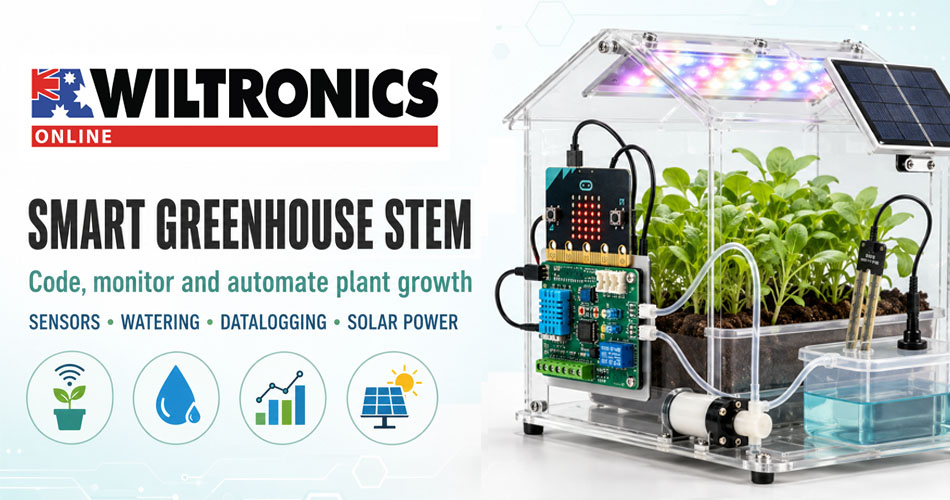
Smart Greenhouse STEM Projects with micro for Schools
A smart greenhouse turns plant growth into a practical lesson in coding, electronics, environmental science and engineering. Instead of simply watering plants on a timetable, students can measure real conditions, write programs that respond to sensor readings and investigate how changes affect growth.
The result is a rich STEM project with a visible real-world outcome. Students can see when their code switches on a pump, changes a grow light or records new data—and the health of the plants provides immediate evidence of whether the system is working.
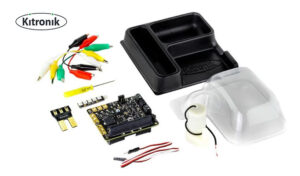
The Kitronik Smart Greenhouse Kit for the BBC micro provides a compact starting point for this type of classroom project. It combines a greenhouse enclosure, environmental control board, water pump, ZIP LED strip and soil-moisture sensing, allowing students to progress from simple measurements to automated feedback control.
What is a smart greenhouse?
A conventional greenhouse creates a protected environment for plants. A smart greenhouse adds electronic sensing, programmable control and, potentially, datalogging.
In a school project, a smart greenhouse can be programmed to:
- monitor soil moisture;
- respond when the growing medium becomes too dry;
- switch a water pump on and off;
- use LEDs to provide a visual warning or simulate a grow light;
- monitor water levels;
- measure environmental conditions over time; and
- compare plant growth under different programmed conditions.
This creates a feedback system. A sensor measures an input, the micro runs a programmed rule, and the control board activates an output. New sensor readings then show whether the action changed the conditions.
Soil becomes dry → sensor value changes → micro:bit evaluates the reading → pump turns on → soil moisture rises → pump turns offStudents are not just building a model. They are learning how automated systems make decisions using data.
Why smart greenhouses work so well as STEM projects
Smart greenhouse activities connect several learning areas within one ongoing investigation.
Science
Students explore plant requirements, water uptake, germination, light, temperature and environmental variables. They can form hypotheses and test how different conditions influence growth.
Technology and coding
Students use sensor inputs, variables, conditional statements, loops and output controls. Microsoft MakeCode allows beginners to start with visual blocks before progressing to more complex programs.
Engineering
The project requires students to define a problem, design a solution, test it and refine it. They must consider water delivery, sensor placement, stability, power and the consequences of incorrect thresholds.
Mathematics
Sensor readings provide data for tables, graphs, averages, ranges and comparisons. Students can calculate water consumption, germination rates and changes in plant height.
Sustainability
Automatic watering and renewable power extensions create opportunities to discuss water conservation, energy use, food production and efficient resource management.
What is included in the Kitronik Smart Greenhouse Kit?
The Kitronik Smart Greenhouse Kit includes the core hardware needed to build a micro growing system:
- two-part moulded greenhouse enclosure;
- Kitronik Environmental Control Board;
- water pump;
- Kitronik ZIP Stick;
- Mini Prong soil-moisture sensor;
- five crocodile leads;
- ZIP extension cable;
- screwdriver; and
- assembly and coding guide.
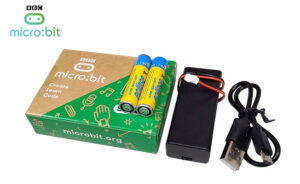
The kit supports both micro V1 and V2, but the micro itself is purchased separately. The Micro Go V2 Development Board Kit is a convenient way to add the programmable controller required for the project.
The greenhouse can be powered by three AA batteries or a suitable plug-in power supply. Teachers will also need seeds, growing medium, water and access to a web browser for MakeCode.
Fast-growing plants such as cress, sprouting white mustard and microgreens are useful because students can observe changes within a short teaching sequence.
The environmental control board: the centre of the system
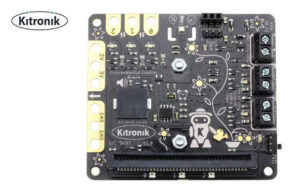
At the heart of the greenhouse is the Kitronik Environmental Control Board for BBC micro. It connects the micro to sensors and powered outputs, allowing a program to control devices such as a water pump, fan, servo or heater pad.
This makes the board useful beyond the supplied greenhouse. Once students understand its inputs and outputs, they can design other environmental control projects, including:
- an automatic plant-watering station;
- a temperature-responsive ventilation model;
- a water-level alarm;
- a timed lighting system; or
- a small renewable-energy investigation.
Kitronik provides custom MakeCode blocks for the board, reducing the amount of low-level code beginners need to write. Students can concentrate on the logic of the system: what should be measured, what threshold should trigger an action and when should that action stop?
Stage 1: begin with soil-moisture measurement
The best introduction is to measure conditions before automating anything.
Students can take sensor readings from dry soil, damp soil and saturated soil, then record the values. This helps them understand that a sensor produces data that must be interpreted; it does not independently know whether a plant needs water.
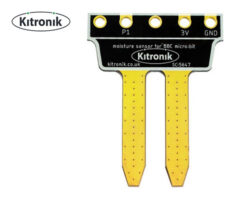
The Kitronik Prong Soil Moisture Sensor for BBC micro is also available as a simple standalone activity. It attaches directly to a micro or can be connected with crocodile clips, providing an analogue reading based on the moisture present in the soil.
A basic program might display:
- a happy icon when moisture is within the target range;
- a warning icon when the soil is becoming dry; and
- an alert or sound when watering is required.
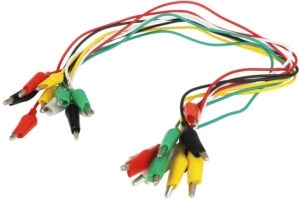
For classroom circuit work outside the complete greenhouse kit, a set of alligator clip jumper leads provides reusable colour-coded connections.
Investigation idea: calibrate the moisture sensor
- Place equal amounts of growing medium into several containers.
- Add a different measured volume of water to each container.
- Take several sensor readings from each sample.
- Calculate an average reading for each moisture level.
- Graph added water against the sensor value.
- Use the results to select a provisional “dry soil” threshold.
Students should keep the depth and position of the sensor as consistent as possible. Their results will demonstrate why calibration and repeatable methods matter.
Stage 2: program automatic watering
Once students can interpret moisture readings, they can add the water pump and create a closed-loop control system.
A simple rule might be:
If soil moisture is below the chosen threshold, operate the pump briefly. Wait for the water to spread through the growing medium, then take another reading.
Short pumping intervals are generally better for experimentation than allowing the pump to run continuously. They give the water time to move through the soil and reduce the chance that a single unexpected reading will cause overwatering.
Students can improve the program by adding:
- a delay between watering and retesting;
- a maximum pump runtime;
- separate switch-on and switch-off thresholds;
- a low-water warning; and
- an LED indicator showing the current system state.
Using different on and off thresholds introduces hysteresis. This prevents the pump from rapidly switching on and off when the moisture reading sits close to one threshold.
Stage 3: add light and visual feedback
The greenhouse kit includes a Kitronik ZIP Stick with individually controllable LEDs. These can communicate system status or be used in programmed lighting investigations.
For example:
- blue could indicate that watering is active;
- green could show that moisture is within the target range;
- red could warn that the reservoir needs attention; and
- a moving light pattern could indicate that new data is being collected.
Students can also investigate timed lighting schedules or compare plant growth under different exposure periods. When designing the investigation, they should control other variables such as seed type, water, growing medium and starting conditions.
Stage 4: collect and analyse data
A smart greenhouse becomes a more powerful science activity when students record changes over several days.
Useful variables include:
- soil-moisture reading;
- time and date;
- number of watering events;
- approximate pump runtime;
- plant height;
- leaf count;
- germination percentage; and
- observations of colour or plant health.
Students can plot moisture against time and mark when the pump activated. This allows them to investigate how quickly the growing medium dries, whether watering restores the target range and whether conditions differ between warm and cool days.
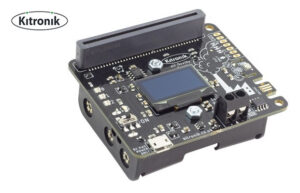
For a broader environmental investigation, the Kitronik Air Quality and Environmental Board for micro can measure temperature, humidity, pressure and estimated air-quality variables. It also includes an OLED display and supports datalogging activities.
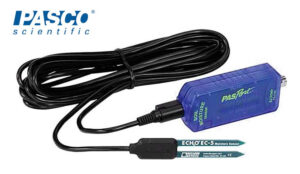
At a more advanced science-laboratory level, the PASCO PASPort Soil Moisture Sensor reports volumetric water content as a percentage. The PASCO EcoZone System can extend the discussion from a single growing environment to interactions between terrestrial, aquatic and decomposition systems.
Stage 5: add renewable power
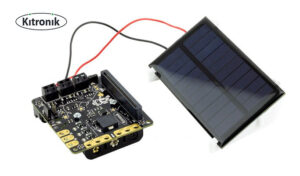
The Solar Cell Kit for the Kitronik Environmental Control Board adds a renewable-energy dimension. It includes a 5 V polycrystalline solar cell and three rechargeable AA Ni-MH batteries, with no soldering required.
This extension allows students to explore questions such as:
- How does light level affect available solar power?
- Why is energy storage needed when sunlight is variable?
- How often can the pump operate from the energy collected?
- Which parts of the system use the most energy?
- How could the program reduce power consumption?
Students can compare a fixed schedule with a sensor-driven watering system and discuss whether automation can conserve both water and energy.
A five-lesson smart greenhouse sequence
| Lesson | Main activity | Key concepts | Suggested outcome |
|---|---|---|---|
| 1 | Assemble the greenhouse and inspect the system | Inputs, outputs and system components | Labelled system diagram |
| 2 | Test and calibrate soil-moisture readings | Analogue data, variables and fair testing | Calibration table and graph |
| 3 | Program an automatic watering rule | Conditions, thresholds and feedback | Working pump-control program |
| 4 | Add indicators and collect data | LEDs, datalogging and communication | Status display and dataset |
| 5 | Evaluate and improve the design | Iteration, reliability and sustainability | Design review and revised code |
The sequence can be shortened for an introductory activity or expanded into a multi-week growing investigation.
Smart greenhouse project ideas by difficulty
Beginner: moisture warning system
Students display an icon or activate an alarm when the soil becomes dry. This introduces sensor readings, comparisons and simple if statements without operating a pump.
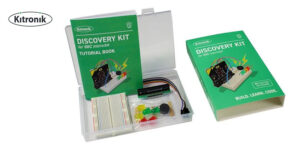
The Kitronik Discovery Kit for BBC micro provides five introductory experiments for students who need to build confidence with programming and electronics first.
Intermediate: automatic watering system
Students choose a moisture threshold and operate the pump for a controlled period. They evaluate whether the threshold keeps the soil within a useful range.
Intermediate: greenhouse status display
Students use colours or symbols to communicate dry, ideal, watering and low-reservoir states. This adds interface design and makes the system easier to monitor.
Advanced: datalogging investigation
Students collect moisture and environmental readings over time, graph the results and identify patterns. They compare alternative control programs using evidence rather than observation alone.
Advanced: solar-powered greenhouse
Students add renewable power, estimate the system’s energy needs and modify their code to reduce unnecessary pump or light operation.
Open-ended: design a new controlled environment
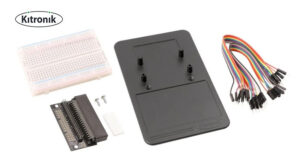
The Kitronik Prototyping System for BBC micro breaks out 21 micro pins and includes a small breadboard and jumper wires. It allows students to add components and develop their own environmental control ideas without soldering.
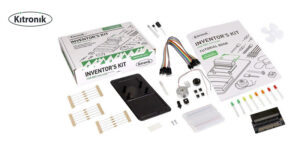
The Kitronik Inventor’s Kit for BBC micro provides a further pathway into LEDs, motors, capacitors and hardware interaction through ten guided experiments.
Planning a successful classroom project
Select fast, manageable plants
Choose seeds that germinate quickly and suit the size of the enclosure. Cress, mustard and microgreens make it easier to gather useful results within a school timetable.
Establish a baseline
Have students observe and measure an uncontrolled setup before introducing automation. This gives them something meaningful to compare with the programmed system.
Change one variable at a time
If students alter the moisture threshold, lighting period, seed type and growing medium simultaneously, it becomes difficult to explain the result. A well-designed investigation keeps other factors as consistent as possible.
Keep electronics dry
The greenhouse electronics are not waterproof. Position the reservoir, tubing, sensor leads and control board carefully, and disconnect power before adjusting wet parts of the setup. If electronics become wet, do not power them until they are fully dry.
Expect sensor drift and variation
Moisture readings can change with soil composition, compaction, sensor position and electrode condition. Recalibration is part of the learning process, not evidence that the project has failed.
Build in fail-safe limits
Programs should limit pump runtime and avoid responding indefinitely to one abnormal sensor value. Students can also add warnings for an empty reservoir or readings outside the expected range.
Protect reusable equipment
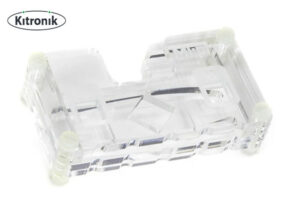
A Kitronik MI Protector Case for BBC micro can help protect the board while keeping its buttons, pins and USB connection accessible. It does not waterproof the micro, so careful positioning remains essential.
What students learn from the final result
The most valuable part of a smart greenhouse project is not simply seeing the pump operate. It is the cycle of evidence-based improvement.
Students must decide what to measure, interpret imperfect sensor data, write rules, test the physical result and refine the system. If a plant is overwatered, the task becomes an engineering question: Was the threshold wrong? Did the pump run for too long? Was there enough delay before the next reading? Was the sensor positioned consistently?
That process reflects how real automated systems are developed. Code, electronics and the physical environment must work together.
Grow coding skills with a living STEM experiment
A smart greenhouse brings coding off the screen and into a system students can observe, measure and improve. It combines plant science with sensors, programmable control, datalogging and sustainable design—while offering entry points for both beginners and experienced makers.
Start with the Kitronik Smart Greenhouse Kit for BBC micro, add a micro development board, and explore Wiltronics’ wider range of BBC micro boards, kits and accessories for classroom STEM projects.
© Electrotech Brands Pty Ltd 2026
Write a Comment
You must be logged in to post a comment.