

UPS Buying Guide Australia: How to Choose the Right UPS
August 25, 2026
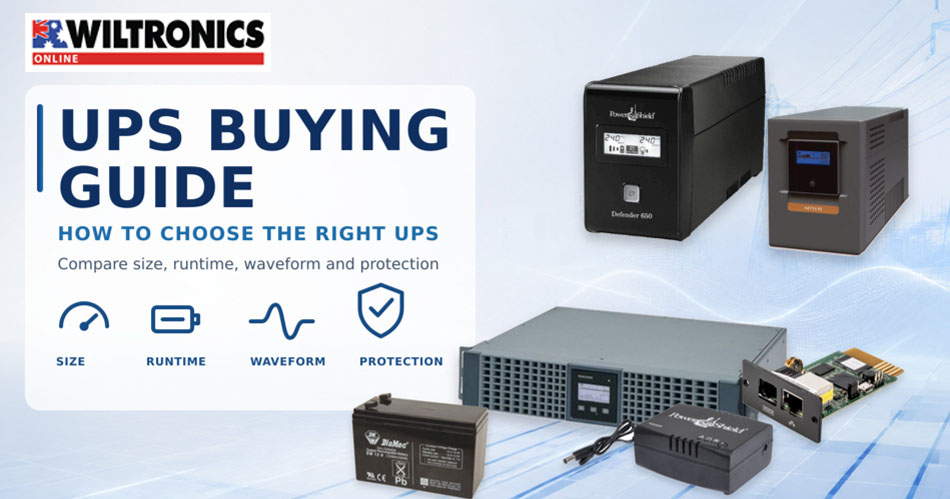
UPS Buying Guide Australia: How to Choose the Right UPS
Choosing the right UPS is not as simple as buying the unit with the largest volt-ampere rating. The connected load must fit within both the UPS volt-ampere and watt limits. The output waveform must suit the equipment. Runtime needs to be estimated at the real operating load, while socket type, communications, physical format and future battery replacement all influence whether the installation will remain practical.
Wiltronics supplies uninterruptible power supplies and backup-power equipment for desktop computers, networks, security systems, point-of-sale equipment, servers and other critical loads. This buying guide focuses on product selection and sizing.
Quick UPS selector
| Application | Features to prioritise | Typical UPS approach |
|---|---|---|
| One desktop computer and monitor | Sufficient watt capacity, Australian outlets, USB shutdown support | Compact line-interactive UPS |
| Router, modem, NBN or low-voltage network device | Correct DC voltage, connector and wattage; efficient small-load operation | Dedicated DC UPS or compact AC UPS |
| Point-of-sale workstation | AVR, communications software and enough time for an orderly shutdown | Line-interactive UPS with monitoring |
| CCTV recorder, cameras and security network | Runtime, automatic restart, communications and suitable outlet count | Line-interactive or rack/tower UPS |
| NAS or small server | Pure sine wave, communications, watt headroom and tested shutdown support | Pure-sine line-interactive UPS |
| Critical server or network rack | Zero transfer time, rack compatibility, management and expandable runtime | Online double-conversion UPS |
| Motor-driven or waveform-sensitive equipment | Pure sine wave and adequate starting capacity | Manufacturer-approved pure-sine UPS |
The table is a starting point only. Always calculate the actual load and check the equipment manufacturers’ requirements before selecting a model.
Compare current Wiltronics UPS options
| Wiltronics UPS | Capacity | Topology and output | Format | Best suited to |
| AVOL 600VA Line Interactive UPS | 600VA / 360W | Line-interactive, simulated sine wave | Tower; 2 Australian sockets | Router, security or light desktop loads |
| PowerShield Defender PSD650 | 650VA / 350W | Line-interactive with AVR | Compact tower | Single workstation, POS or networked PC |
| AVOL 1000VA Line Interactive UPS | 1000VA / 600W | Line-interactive, simulated sine wave | Tower; 3 Australian sockets | Computer, CCTV or general security installation |
| AVOL 1500VA Line Interactive UPS | 1500VA / 900W | Line-interactive, simulated sine wave | Tower | Larger workstation or multi-device load |
| Securview 2000VA Line Interactive UPS | 2000VA / 1200W | Line-interactive, simulated sine wave | Tower; 4 Australian sockets | Higher-capacity security or computer system |
| PowerShield Commander PSCM2000 | 2000VA; 0.9 output power factor | Line-interactive, pure sine wave | Tower | Servers, gates, cameras, motors and sensitive equipment |
| 1100VA / 900W Online Rackmount/Tower UPS | 1100VA / 900W | Online, zero transfer time | 2U rack/tower; IEC outlets | Small servers, networks and critical security systems |
| PowerShield Centurion RT PSCERT1000 | 1000VA; 0.9 output power factor | Online double conversion, pure sine wave | Rack/tower | Mission-critical equipment and expandable-runtime applications |
Specifications and availability can change. Open the linked product page and confirm the current datasheet before ordering. A UPS is normally intended to bridge a brief interruption, support an orderly shutdown or keep a critical light load running temporarily—not replace a generator or long-duration battery system.
Start with watts—not VA alone
UPS product names commonly emphasise volt-amperes, such as 650VA, 1000VA or 2000VA. However, the watt rating is equally important.
- VA represents apparent power.
- Watts represent real power used by the load.
A UPS must be able to support both values. For example, a unit rated at 1000VA and 600W cannot support an 800W load merely because 800 is below 1000. Its 600W limit would already be exceeded.
The safest practical approach is to list every device that will use a battery-backed outlet and estimate or measure its maximum operating power. This may include:
- computer or server;
- monitor;
- network switch;
- router or modem;
- NAS;
- CCTV recorder;
- selected cameras or PoE equipment; and
- required peripherals.
Do not automatically connect high-draw devices such as laser printers, heaters, kettles, large motors or laboratory heating equipment. Their current demand can overload a UPS unless the combination has been specifically assessed and approved.
A simple sizing example
Suppose a workstation includes:
- desktop computer: 280W maximum expected load;
- monitor: 45W;
- router and network equipment: 25W.
The estimated total is 350W. Adding 25 per cent headroom gives approximately 438W:
350W × 1.25 = 437.5W
The selected UPS should have a continuous watt rating above that value and an adequate VA rating. Additional headroom may be appropriate where equipment has variable demand, future expansion is likely or the manufacturer recommends a larger margin.
For a modest computer or security installation, the AVOL 1000VA Line Interactive UPS – 600W illustrates why both specifications matter: the model name includes 1000VA, while the listed real-power capacity is 600W.
Once the load has been calculated, compare Wiltronics UPS models by their watt capacity rather than using VA as the only filter.
Runtime is not fixed
UPS runtime is the estimated time the unit can operate from its battery at a particular load. It should never be treated as one universal number.
Runtime is influenced by:
- total connected watts;
- battery capacity and condition;
- battery age;
- ambient temperature;
- UPS efficiency;
- power factor;
- whether the load remains constant; and
- the manufacturer’s test method.
As load increases, runtime falls—often sharply. Compare runtime figures only when the stated test load is known. The Securview 2000VA / 1200W Line Interactive Tower UPS, for example, lists an estimated runtime at a specified 240W load. That figure is more useful than an unqualified claim because it gives the reader a reference point.
Decide what the UPS must accomplish. A workstation may need only enough time to save work and shut down. A router or surveillance recorder may need a longer operating period. If extended runtime is essential, consider a UPS platform designed for compatible external battery banks rather than oversizing blindly.
Line-interactive versus online UPS
Line-interactive UPS
A line-interactive UPS is a practical choice for many offices, classrooms, workshops, point-of-sale systems and security installations. It commonly includes Automatic Voltage Regulation, or AVR, which can correct some input-voltage fluctuations without switching fully to battery operation.
Benefits can include:
- good value for general equipment protection;
- AVR for common voltage variation;
- efficient everyday operation;
- compact tower options; and
- short battery transfer times suitable for many computers and electronic devices.
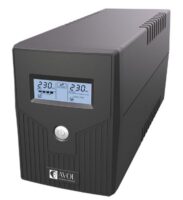
Wiltronics options range from compact units such as the AVOL 600VA Line Interactive UPS – 360W to larger models such as the Securview 2000VA / 1200W Line Interactive Tower UPS.
Line-interactive models are not all identical. Compare their watt capacity, waveform, transfer time, communications, outlets and runtime rather than choosing on topology alone.
Online double-conversion UPS
An online double-conversion UPS continuously supplies the connected load through its power-conversion system. This isolates the output from a wider range of incoming disturbances and provides no transfer delay when input power fails.
Online systems are commonly considered for:
- critical servers;
- network and communications racks;
- important surveillance infrastructure;
- sensitive technical equipment;
- sites with poor or unstable mains power; and
- applications where even a short transfer interval is unacceptable.
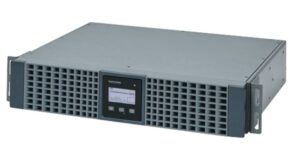
The 1100VA / 900W Online Rackmount/Tower UPS is specified for zero-second transfer and can be installed as a tower or in a compatible 19-inch rack. For higher-level installations, the PowerShield Centurion RT PSCERT1000 1000VA Pure Sine Wave UPS uses true online double-conversion architecture and supports compatible external battery expansion.
Online UPS systems usually cost more and may produce more heat or fan noise than a compact desktop unit. The additional protection should therefore be matched to the consequence of downtime.
Simulated sine wave versus pure sine wave
When running from battery, a UPS produces an AC output waveform. Entry and general-purpose line-interactive models may use a simulated, stepped or approximated sine wave. More advanced models provide a pure sine wave that more closely resembles normal mains power.
A simulated sine-wave UPS may be suitable for many conventional desktop, network and security loads when the connected equipment manufacturer allows it. Pure sine wave is the stronger choice for:
- servers and higher-value computing equipment;
- active power-factor-corrected power supplies where compatibility is important;
- motor-driven equipment approved for UPS use;
- sensitive audio, communications or measurement systems; and
- equipment whose manufacturer specifies a sine-wave source.
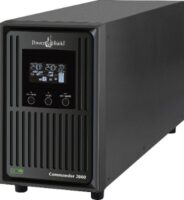
The PowerShield Commander PSCM2000 2000VA Pure Sine Wave UPS combines a pure sine-wave battery output with AVR and management software. Rack/tower alternatives include the PowerShield Commander PSCRT2000 2000VA Pure Sine Wave UPS and PowerShield Commander PSCRT3000 3000VA Pure Sine Wave UPS.
Do not assume that a larger VA rating automatically means pure sine wave. Waveform is a separate specification.
Browse pure-sine-wave UPS options at Wiltronics.
Choose the right physical format and outlets
Tower UPS
Tower units are convenient beside a desk, under a counter or near a freestanding security cabinet. Check the ventilation clearance, operating noise, cable reach and access to the front display or controls.
Rackmount and rack/tower UPS
Rackmount equipment keeps power protection within a network or security rack. Confirm:
- rack width and usable depth;
- rack-unit height;
- equipment weight;
- rail compatibility;
- airflow;
- cable management; and
- whether installation requires two people.
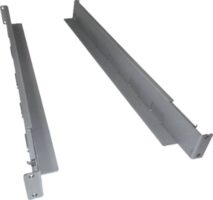
The PowerShield Sliding Rackmount Rails are designed for compatible 2RU PowerShield models, but rail and cabinet dimensions still need to be checked before purchase.
Australian sockets and IEC outlets
Count the outlets, but also identify their type. A desktop UPS may use Australian three-pin sockets, while a rack unit may provide IEC C13 outlets. Adaptors and power distribution equipment should not be improvised. Plan the entire connection path and distinguish between battery-backed outlets and surge-only outlets where both are present.
Communications and automatic shutdown
USB, RS-232 or network management can be as important as battery capacity. With compatible software, a UPS may report mains status, load, battery condition and estimated runtime, then initiate an orderly shutdown when an outage continues.
This is especially valuable for unattended systems such as:
- servers;
- NAS units;
- CCTV recorders;
- remote workstations; and
- point-of-sale computers.
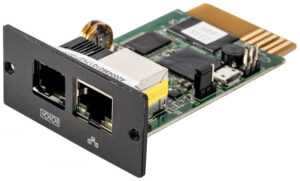
Before purchase, confirm that the UPS communications method and software support the operating system or device. A network-management card may be appropriate where several devices or administrators need remote status and alerts. Wiltronics carries the PowerShield Internal PSSNMPV4 Communications Card for compatible installations.
Software compatibility should be checked against current vendor documentation. Do not assume that a USB port guarantees automatic shutdown on every operating system.
UPS options by application
Home office or single workstation
For a computer, monitor and small networking load, a compact line-interactive model may provide enough time to save work and shut down correctly. Compare the PowerShield Defender PSD650 650VA 350W UPS with the PowerShield Defender PSD1200 1200VA UPS when the load or required runtime increases.
Compare compact and desktop UPS systems at Wiltronics.
Network, NBN and low-voltage equipment
Keeping the modem and router powered can preserve local connectivity during a brief outage, although external network infrastructure may also need to remain operational. Where the load is compatible, a dedicated DC system can avoid converting battery DC to AC and then back to DC.
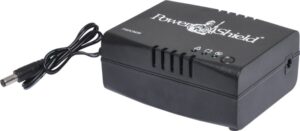
The PowerShield DC-Mini36 12–24V DC 36W NBN UPS is designed for compatible routers, modems, cameras, Wi-Fi extenders and VoIP phones. Check voltage, polarity, connector, maximum wattage and device compatibility carefully.
CCTV and security systems
Begin with the combined load of the recorder, PoE switch, network equipment and any cameras that must remain operating. Consider automatic restart, event logging and whether the installation needs rack mounting.
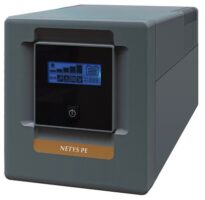
The 1000VA Line-Interactive Tower UPS – 600W is positioned for security equipment, while the Securview 1700VA / 1350W Rackmount/Tower UPS suits installations needing higher capacity and flexible mounting.
Explore UPS options for CCTV and security systems.
Servers and sensitive equipment
For servers, evaluate pure sine wave, communications, shutdown integration, outlet format, redundancy plans and runtime at the real server load. Where continuity or power quality is critical, an online double-conversion system may be justified.
The PowerShield Commander PSCM2000 is a pure-sine tower option. The PowerShield Centurion RT PSCERT1000 and 1100VA / 900W Online Rackmount/Tower UPS address applications that call for online operation.
Compare pure-sine and online UPS systems.
Battery maintenance and lifecycle planning
UPS batteries are consumable components. Their service life varies with temperature, discharge frequency, depth of discharge, charging conditions and battery design.
Create a maintenance plan that includes:
- recording the installation date;
- keeping ventilation paths clear;
- reviewing battery and fault indicators;
- testing shutdown procedures;
- performing controlled runtime tests where appropriate;
- checking for swelling, leakage, unusual heat or odour;
- replacing batteries with approved compatible types; and
- recycling used batteries through an appropriate service.
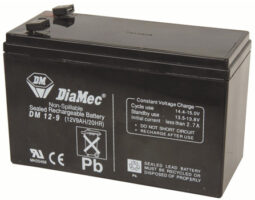
Wiltronics carries UPS sealed lead-acid replacement batteries, but the voltage, amp-hour capacity, terminal type, dimensions, battery quantity and manufacturer requirements must all match. A battery that physically fits is not automatically a correct replacement.
Never open a UPS unless the work is authorised and performed by a suitably qualified person. Hazardous voltages may remain present even when the unit is disconnected from mains power.
Common UPS buying mistakes
| Mistake | Better approach |
| Choosing by VA alone | Confirm both VA and continuous watt limits. |
| Treating runtime as fixed | Use a runtime figure or curve based on a load close to the real installation. |
| Connecting every nearby device | Reserve battery-backed sockets for essential loads and avoid unsuitable high-current equipment. |
| Ignoring waveform compatibility | Check whether the connected equipment requires pure sine wave. |
| Forgetting communications | Confirm hardware, software and automatic-shutdown compatibility before purchase. |
| Leaving no expansion margin | Allow reasonable capacity for load variation and planned additions. |
| Assuming batteries last indefinitely | Record installation dates, test periodically and plan approved replacements. |
UPS buying checklist
Before ordering, confirm:
- total maximum watts of the essential load;
- total VA requirement where available;
- required runtime at that load;
- line-interactive or online topology;
- simulated or pure sine-wave output;
- transfer-time requirements;
- number and type of output sockets;
- tower, rackmount or rack/tower format;
- rack dimensions and rail requirements;
- USB, RS-232 or network-management needs;
- automatic shutdown compatibility;
- operating temperature, ventilation and noise;
- battery replacement method and availability; and
- the equipment manufacturer’s UPS recommendations.
Frequently asked questions
What size UPS do I need for a computer?
Add the maximum expected wattage of the computer, monitor and any essential peripherals. Select a UPS with watt and VA ratings above the calculated load, allowing reasonable headroom. Then check the manufacturer’s runtime data at a similar load.
Is a 1000VA UPS enough for a gaming PC or workstation?
It depends on the UPS watt rating and the workstation’s actual maximum load. A 1000VA UPS may be rated for 600W, 900W or another value. Include the monitor and essential accessories, then compare the total with both UPS limits.
What is better: line-interactive or online UPS?
Line-interactive UPS systems are suitable for many general office, computer, network and security applications. Online double-conversion UPS systems provide continuous power conversion and zero transfer time, making them more appropriate for critical or sensitive loads and unstable power environments.
Do I need a pure sine-wave UPS?
Pure sine wave is recommended when required by the equipment manufacturer and is commonly selected for servers, sensitive systems and compatible motor-driven equipment. Many conventional electronic loads can operate from an appropriate simulated sine-wave UPS, but compatibility should be confirmed.
How long will a UPS run?
Runtime depends mainly on connected load and battery capacity, but also battery age, temperature and efficiency. Use a runtime figure or curve based on a load close to your real installation.
Can I plug a powerboard into a UPS?
Do not assume this is acceptable. Follow the UPS manufacturer’s instructions, socket limits and local electrical requirements. Avoid daisy-chaining boards or using adaptors to exceed the designed outlet capacity.
Can a UPS run a printer?
Laser printers can have high peak current demand and are commonly excluded from battery-backed outlets. Check both manufacturers’ guidance before connecting any printer.
How often should UPS batteries be replaced?
There is no single interval for every installation. Battery life depends on chemistry, temperature, discharge history and manufacturer specifications. Monitor battery status, test performance and replace approved batteries when indicated.
Choose backup power with Wiltronics
The right UPS begins with the load, not the model number. Calculate watts, decide how much runtime is genuinely required, identify waveform and transfer requirements, then compare outlets, communications, physical format and battery support.
For a desktop or small security installation, a compact line-interactive UPS may provide the most practical balance of protection and cost. Servers, racks and sensitive equipment may justify pure-sine or online double-conversion systems with remote management and expandable runtime.
Explore the complete Wiltronics range of UPS backup-power systems, accessories and replacement batteries, or contact Wiltronics for help matching a UPS to your load and installation requirements.
© Electrotech Brands Pty Ltd 2026
Write a Comment
You must be logged in to post a comment.