

Best Microcontrollers for Schools: Arduino, Raspberry Pi Pico and ESP32 Compared
May 4, 2026
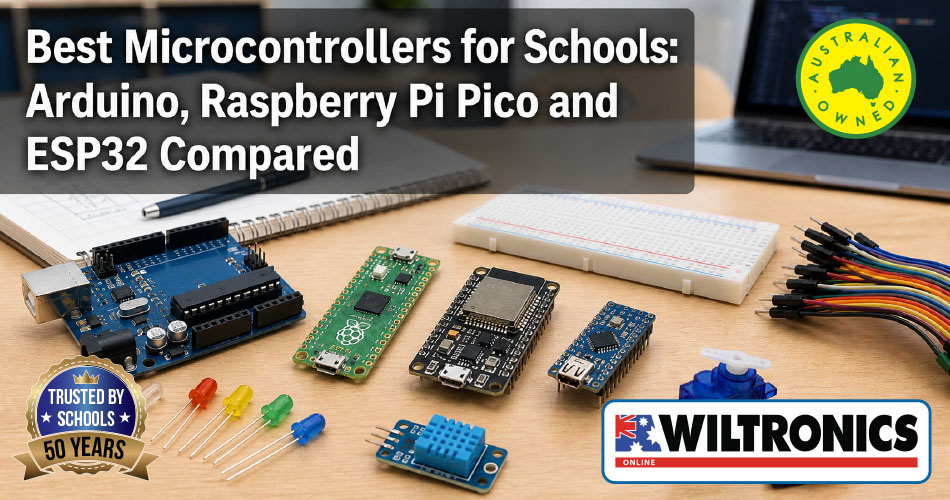
Best Microcontrollers for Schools: Arduino, Raspberry Pi Pico and ESP32 Compared
Microcontrollers are one of the most practical ways to bring coding, electronics, sensors, robotics and STEM problem-solving into the classroom. They turn abstract code into something students can see, test and improve: an LED switches on, a buzzer sounds, a sensor records data, or a motor responds to an input.
For teachers, STEM coordinators and school purchasing teams, the real question is not simply “What is a microcontroller?” It is:
Which microcontroller board or kit should we choose for our students, projects and classroom setup?
This guide compares popular classroom options including Arduino Uno, Arduino-compatible starter kits, Raspberry Pi Pico, ESP32 and Arduino Nano 33 IoT, with practical recommendations for Australian STEM, Digital Technologies, Design and Technologies, Science and project-based learning.
As an Australian electronics supplier with more than 50 years of experience, Wiltronics supports schools, makers and technology educators with practical boards, components, learning kits and STEM resources.
Quick Comparison: Which Microcontroller Should Schools Choose?
| Classroom need | Best option | Why it fits |
|---|---|---|
| Beginner electronics and coding | Arduino Uno or Arduino-compatible Uno | Simple, widely used and ideal for LEDs, buttons, buzzers, sensors and breadboards |
| Class sets and repeatable lessons | Arduino-compatible starter kits | Kits bundle the board, components and learning activities |
| MicroPython and compact projects | Raspberry Pi Pico | Good pathway for Python-based physical computing |
| Wireless and IoT projects | ESP32 | Includes WiFi and Bluetooth capability for connected projects |
| Compact advanced IoT builds | Arduino Nano 33 IoT | Small format with WiFi, Bluetooth, IMU and secure storage features |
| Science data projects | Microcontroller plus sensors | Useful for temperature, light, humidity, soil moisture and environmental monitoring |
For a first classroom rollout, a practical pathway is:
| Stage | Recommended hardware | Learning outcome |
|---|---|---|
| Beginner | Arduino-compatible starter kit | Inputs, outputs, circuits and basic coding |
| Intermediate | Arduino or Pico plus sensors | Data collection, measurement and project design |
| Advanced | ESP32 or Arduino Nano 33 IoT | Wireless communication, IoT and connected prototypes |
What Is a Microcontroller?
A microcontroller is a small programmable board designed to control electronic components. It can read inputs, make decisions based on code, and control outputs.
For example, a microcontroller can:
- read a button press
- measure temperature or light
- turn LEDs on and off
- trigger a buzzer
- move a servo motor
- send data wirelessly
- control a simple robot or automated model
This makes microcontrollers ideal for hands-on STEM because they connect code, circuits and real-world behaviour in one activity.
Why Microcontrollers Work So Well in Schools
Microcontrollers make coding visible. Students can see immediately whether their program works, then adjust the code, wiring or design to improve the result.
They are useful for:
- Digital Technologies: algorithms, inputs, outputs, data and digital systems
- Design and Technologies: prototyping, testing, iteration and designed solutions
- Science: data collection, measurement and environmental monitoring
- STEM clubs: robotics, automation, coding challenges and invention projects
- Senior projects: IoT, wireless sensors, embedded systems and engineering prototypes
The Australian Curriculum: Technologies includes Design and Technologies, where students use design thinking and technologies to generate designed solutions, and Digital Technologies, where students use computational thinking and information systems to create digital solutions. Microcontroller projects can support both areas when used in well-planned classroom activities.
Best Microcontroller for Beginner STEM Lessons: Arduino Uno
For most beginner classrooms, Arduino Uno or an Arduino-compatible Uno board is the easiest place to start.
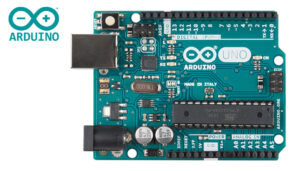
The Arduino Uno R3 is based on the ATmega328 microcontroller and includes 14 digital input/output pins, 6 analog inputs, USB connection, power jack, ICSP header and reset button.
That makes it well suited to:
- LED traffic lights
- button and buzzer circuits
- basic sensor readings
- servo motor control
- breadboard activities
- beginner robotics
- coding and electronics fundamentals
Best fit: Years 5–10 beginner electronics, STEM clubs, Design and Technologies projects, introductory robotics and coding lessons.
Best Option for Class Sets: Arduino-Compatible Starter Kits
For a class, club or workshop, a starter kit is usually better than buying a board alone.
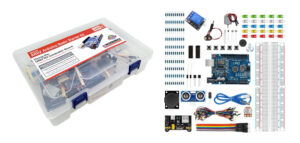
The ARD2 Arduino Compatible Starter Kit – UNO R3 16 Projects provides hands-on projects using LEDs, buttons, buzzers, sensors, motors and relays. Wiltronics notes learning outcomes connected to Arduino, coding, electronic components, creativity, problem-solving and critical thinking.
Starter kits are useful because they:
- reduce teacher preparation time
- give students a consistent set of parts
- support repeatable lessons
- help beginners avoid missing components
- make it easier to scale activities across a class
Best fit: classroom sets, beginner workshops, STEM clubs, Year 7–10 electronics and schools introducing Arduino for the first time.
Best Microcontroller for MicroPython: Raspberry Pi Pico
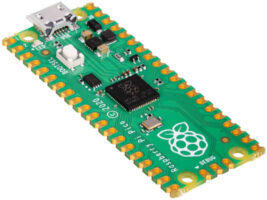
The Raspberry Pi Pico is a strong option for schools that want a compact microcontroller and a pathway into MicroPython.
The Raspberry Pi Pico uses the RP2040 microcontroller chip and is designed as a cost-effective, adaptable development platform, with a compact 51 x 21 mm board, micro-USB connector and dual castellated/through-hole pins.
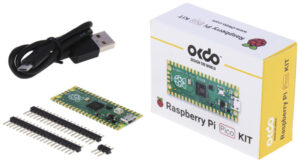
For a simple starting package, the Raspberry Pi Pico Kit includes the Pico microcontroller board, three headers, a micro-USB cable and a quick-start guide for MicroPython.
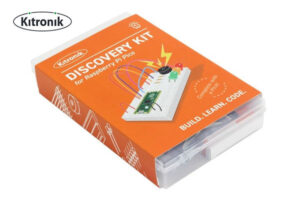
For a more classroom-ready option, the Kitronik Discovery Kit for Raspberry Pi Pico includes a Raspberry Pi Pico with pre-fitted headers, a large breadboard, components and seven experiments covering simple coding, interrupts, threads, digital inputs, and analog and digital outputs. No soldering is required for the included activities.
Best fit: Python-focused classrooms, Years 7–12 STEM activities, physical computing, sensor projects and extension work.
Best Microcontroller for IoT Projects: ESP32
For wireless projects, the ESP32 is a strong choice.
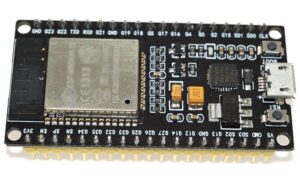
The Wiltronics ESP32 Development Board is a 2.4 GHz dual-mode WiFi and Bluetooth board, making it useful for connected projects and IoT-style prototypes.
ESP32 projects can include:
- wireless temperature monitoring
- Bluetooth-controlled devices
- smart classroom models
- remote environmental sensors
- IoT dashboards
- connected automation projects
ESP32 is usually better after students already understand basic inputs, outputs and circuits. It can be more advanced than an Arduino Uno, but it opens up richer real-world project possibilities.
Best fit: senior STEM, IoT, wireless sensor networks, automation projects, advanced clubs and extension students.
Best Compact Advanced Option: Arduino Nano 33 IoT
The Arduino Nano 33 IoT is useful when students need a compact board with built-in connectivity and sensing features.
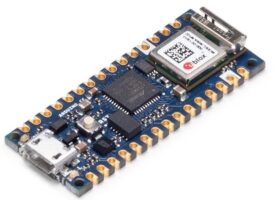
Wiltronics describes the Arduino Nano 33 IoT as a small board with WiFi and Bluetooth connectivity, an Arm Cortex-M0+ SAMD21 processor, ESP32-based WiFi and Bluetooth module, 6-axis IMU and ATECC608A cryptochip for secure storage.
This makes it suitable for more advanced projects such as:
- motion-sensing devices
- compact IoT prototypes
- connected wearables or small models
- data collection with wireless communication
- senior design projects
Best fit: advanced students, compact IoT projects, senior Design and Technologies, engineering-style prototypes and extension learning.
Classroom Project Ideas by Difficulty
Beginner projects
LED traffic light
Students code a red, yellow and green LED sequence to learn timing, outputs and basic program flow.
Button-controlled buzzer
Students connect an input and output, then program a buzzer to respond when a button is pressed.
Light sensor night lamp
Students use a light sensor to switch an LED on when the room gets dark.
Intermediate projects
Temperature monitor
Students read a temperature sensor and display or log the result for a simple science investigation.
Soil moisture alert
Students build a plant-watering indicator using a moisture sensor and LED or buzzer.
Servo-controlled gate
Students use a servo motor to model an automated gate, door or sorting mechanism.
Advanced projects
Wireless classroom sensor
Using an ESP32, students send sensor readings wirelessly for an IoT-style monitoring project.
Smart greenhouse model
Students combine light, temperature and soil moisture sensors with outputs such as LEDs, fans or pumps.
Motion-aware IoT device
Using an Arduino Nano 33 IoT, students combine motion sensing and wireless connectivity in a compact build.
Australian Curriculum Alignment
Microcontroller projects can support Australian Curriculum learning when they are framed around designing, coding, testing, evaluating and improving digital or electronic solutions.
They may connect with:
- Digital Technologies: computational thinking, algorithms, data, digital systems and implementation of digital solutions
- Design and Technologies: design thinking, prototyping, testing, iteration and designed solutions
- Science: measurement, data collection, variables, energy, circuits and environmental monitoring
- General capabilities: critical and creative thinking, digital literacy, collaboration and problem-solving
For formal curriculum documentation, teachers should verify exact year-level descriptions, achievement standards and content descriptions against the current Australian Curriculum or relevant state and territory syllabus documents.
FAQ
What is the best microcontroller for schools?
For most beginner classrooms, an Arduino Uno or Arduino-compatible starter kit is the best starting point. It is easy to use, widely supported and suitable for LEDs, buttons, buzzers, sensors, motors and breadboard activities.
Is Arduino or Raspberry Pi Pico better for beginners?
Arduino Uno is often easier for first electronics lessons because it is widely used with beginner-friendly circuits and kits. Raspberry Pi Pico is a strong choice when the classroom focus is MicroPython or compact physical computing projects.
What microcontroller should schools use for IoT projects?
ESP32 is a good choice for IoT because it supports WiFi and Bluetooth projects, making it suitable for wireless sensors, connected devices and smart classroom prototypes.
Do students need to solder microcontroller projects?
Not always. Many beginner projects use breadboards and jumper wires. The Kitronik Discovery Kit for Raspberry Pi Pico includes a Pico with pre-fitted headers, so no soldering is required for the included activities.
Are microcontrollers useful for science lessons?
Yes. Microcontrollers can collect data from sensors, making them useful for investigations involving temperature, light, humidity, soil moisture, movement and other measurable conditions.
Should schools buy boards or starter kits?
For beginners and class sets, starter kits are usually easier because they include the board, components and activities. Individual boards are better when a school already has components or is building custom projects.
What is the best pathway for teaching microcontrollers?
A practical pathway is to start with Arduino-style beginner circuits, add sensors for science and data projects, then move into Raspberry Pi Pico for MicroPython or ESP32 for wireless IoT projects.
Conclusion
The best microcontroller for a school depends on the learning goal.
For beginner electronics and coding, start with Arduino Uno or an Arduino-compatible starter kit. For Python-based physical computing, choose Raspberry Pi Pico. For wireless and IoT projects, move into ESP32 or Arduino Nano 33 IoT.
A strong classroom pathway is:
Start with Arduino-compatible kits → add sensors and data projects → extend into Raspberry Pi Pico or ESP32 for MicroPython and IoT.
That gives students a clear progression from basic circuits to real-world digital systems, while giving teachers a practical way to build STEM capability over time.
© Electrotech Brands Pty Ltd 2026
Write a Comment
You must be logged in to post a comment.