

Which Audio Cable Do I Need? A Guide to Matching Connectors
August 4, 2026
Which Audio Cable Do I Need? A Guide to Matching Connectors
Choosing an audio cable involves more than finding two plugs that physically fit.
The cable must also suit the signal being carried. Your connection may be analogue or digital, mono or stereo, balanced or unbalanced, and microphone, line or speaker level.
At Wiltronics, we stock audio leads, adaptors, connectors and bulk cable for home entertainment systems, recording equipment, public-address systems, musical instruments, computers and electronics projects.
In this guide, we explain how to identify the connections on your equipment and choose the right cable without getting lost in unnecessary technical detail.
Browse our complete range of audio cables, including 3.5mm, RCA, XLR, jack, MIDI and optical options.
Our quick recommendation: Identify the output on the source device and the input on the receiving device. Then confirm whether the connection is analogue or digital, mono or stereo, balanced or unbalanced, and line or speaker level.
Quick Audio Cable Selector
| What are you connecting? | Typical cable or adaptor |
|---|---|
| Phone, tablet or computer to powered speaker | 3.5mm stereo plug to 3.5mm stereo plug |
| Phone or computer to a Hi-Fi amplifier | 3.5mm stereo plug to 2 × RCA plugs |
| CD player or Hi-Fi component to amplifier | 2 × RCA plugs to 2 × RCA plugs |
| Microphone to mixer or audio interface | XLR female to XLR male |
| Microphone to compatible 6.35mm balanced input | XLR female to 6.35mm TRS |
| Mixer or interface with balanced jack connections | 6.35mm TRS to 6.35mm TRS |
| TV to compatible soundbar or amplifier | TOSLINK optical cable |
| Combined headset plug to separate computer sockets | TRRS headset adaptor |
| Amplifier to passive speakers | Speaker cable |
| Musical keyboard or controller to computer | Compatible MIDI-to-USB interface |
These are common combinations rather than universal rules. Always check the labels and specifications for both devices before ordering.
Step 1: Identify the Output and Input
Start with the equipment rather than the cable.
Find the output on the source device and the input on the receiving device.
A source may be a:
- Television
- Smartphone
- Computer
- Microphone
- Musical instrument
- Mixer
- Media player
- Audio interface
- Amplifier
The receiving device may be a:
- Powered speaker
- Soundbar
- Amplifier
- Mixer
- Recorder
- Computer
- Passive speaker
- Pair of headphones
Look closely at the connector shape and nearby labels. Common markings include:
- Headphone
- Audio out
- Line out
- Line in
- Mic
- Optical
- Digital audio
- Left and right
- Speaker out
- MIDI in or out
Do not assume that similar-looking ports perform the same function. A 3.5mm microphone input, headphone output and four-pole headset socket may look almost identical while using different contacts and signal arrangements.
Step 2: Check the Signal Type
Before selecting a cable, answer four questions.
Is the Connection Analogue or Digital?
Analogue audio cables carry a continuously varying electrical signal.
Common analogue connectors include:
- 3.5mm jacks
- RCA connectors
- 6.35mm TS and TRS jacks
- XLR connectors
Digital audio transmits encoded data between compatible devices. TOSLINK is a common optical digital-audio connection used with televisions, soundbars and home-cinema equipment.
For more background, read our guide to how audio cables affect sound and signal transmission.
Is the Signal Mono or Stereo?
A mono connection carries one audio channel.
A stereo connection carries separate left and right channels.
One 3.5mm TRS lead commonly carries unbalanced stereo audio. Professional systems may instead use two balanced cables, with one carrying the left channel and another carrying the right.
Is the Connection Balanced or Unbalanced?
Balanced connections are commonly used with microphones, mixers, audio interfaces and professional sound equipment. When the complete connection supports balanced operation, it can reduce noise picked up along the cable.
Common balanced connectors include:
- Three-pin XLR
- 6.35mm TRS
However, the connector alone does not guarantee a balanced signal. The output, cable wiring and receiving input must all support balanced operation.
Common unbalanced connections include:
- 3.5mm stereo
- RCA
- 6.35mm TS
Is It Line-Level or Speaker-Level?
Line-level connections carry relatively low-level audio between equipment such as media players, mixers, amplifiers and powered speakers.
Speaker-level connections carry amplified power from an amplifier to passive speakers.
Do not use lightweight line-level audio cable as a substitute for appropriately selected speaker cable. Browse our audio and speaker cable range for amplifier-to-speaker wiring.
3.5mm Audio Cables
The 3.5mm connector is widely used with headphones, computers, portable speakers and consumer audio equipment.
3.5mm TRS Stereo
A standard 3.5mm stereo connector has three conductive sections:
- Tip
- Ring
- Sleeve
In a typical stereo headphone or auxiliary connection, these carry left audio, right audio and common ground.
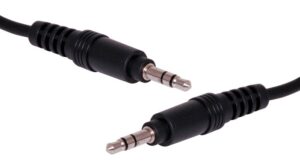
Our 3.5mm Stereo Plug-to-Plug Cable is available in multiple lengths for compatible speakers, computers and audio equipment.
For short connections, consider the 50cm 3.5mm Stereo Patch Lead.
Choose a 3.5mm Stereo Cable For:
- Computer audio output to powered speakers
- Portable player to car auxiliary input
- Headphone connections
- Tablet to compatible amplifier input
- Laptop to portable speaker
- General auxiliary audio connections
Some newer phones and tablets require a separate USB-C or Lightning audio adaptor.
3.5mm Extension Leads
When the existing cable is too short, a male-to-female extension provides a cleaner solution than chaining several adaptors.
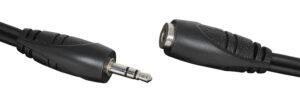
Options include:
TRRS Headset Connections
A TRRS plug has four conductive sections and may carry stereo headphones plus a microphone through one connection.
This format is common with headsets used for laptops, gaming systems, phones and video calls.
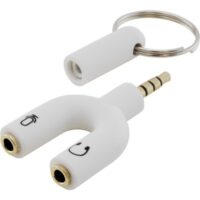
The TRRS-to-Stereo-and-Microphone Adaptor separates a compatible four-pole headset connection into individually labelled headphone and microphone sockets.
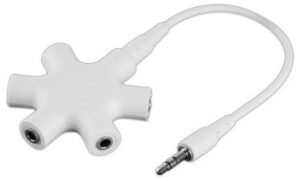
For sharing one stereo output between several listeners, consider the Five-Port Stereo Headphone Splitter.
TRRS wiring standards can vary, so confirm compatibility with the device and headset before purchasing.
2.5mm and 3.5mm Conversion
Some compact or older equipment uses a 2.5mm audio connector.
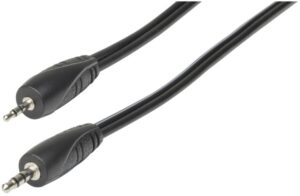
The 2.5mm-to-3.5mm Stereo Plug Cable can connect compatible equipment with different jack sizes.
Browse our wider 3.5mm plugs, sockets and adaptors for inline, panel-mount, right-angle and conversion options.
Connecting 3.5mm Audio to RCA
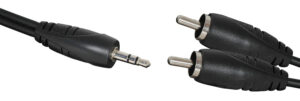
A 3.5mm-to-RCA lead is one of the most useful audio conversion cables.
It normally converts a stereo 3.5mm output into separate left and right RCA connections.
Common Uses
- Computer to Hi-Fi amplifier
- Phone or tablet to stereo system
- Media player to powered speakers
- Laptop to mixer or amplifier with RCA inputs
- Single-board computer audio output to compatible equipment
Available options include:
Check Whether You Need Plugs or Sockets
A cable with two RCA plugs connects directly to RCA sockets on equipment.
An adaptor with RCA sockets accepts another RCA cable.
Suitable options include:
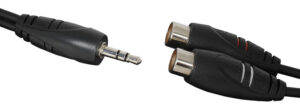
- 3.5mm Stereo Plug-to-2×RCA Sockets
- 3.5mm Stereo Socket-to-2×RCA Plugs
- 3.5mm Stereo Plug-to-2×RCA Socket Adaptor
Check both connector type and gender before ordering.
RCA Audio Cables
RCA connectors are common on amplifiers, Hi-Fi equipment, televisions, media players and consumer audio products.
Analogue stereo RCA connections normally use a pair of plugs:
- White or black for the left channel
- Red for the right channel
Choose an RCA Cable For:
- CD player to amplifier
- Media player to receiver
- Turntable preamplifier to compatible line input
- Television analogue output to amplifier
- Audio processor to consumer Hi-Fi equipment
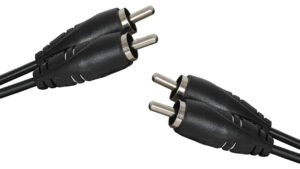
Use a 2×RCA Plug-to-2×RCA Plug Audio Cable when both devices have matching left and right RCA sockets.
Browse our RCA audio plugs and sockets for line sockets, chassis connectors, PCB-mount sockets, joiners and custom cable parts.
Analogue RCA vs Digital Coaxial
The same physical RCA connector may also be used for a digital S/PDIF connection.
A red-and-white RCA pair normally carries analogue left and right audio. A single digital coaxial socket carries a digital signal between compatible devices.
Always check the labels rather than choosing solely by connector shape.
6.35mm TS and TRS Cables
The 6.35mm jack is common on musical instruments, mixers, amplifiers, headphones and professional audio equipment.
It is also known as a quarter-inch jack.
6.35mm TS
A TS connector has:
- Tip
- Sleeve
It commonly carries an unbalanced mono signal.
Typical applications include:
- Electric guitar to amplifier
- Keyboard mono output
- Effects-pedal connections
- Unbalanced line connections
- Some microphones and PA equipment
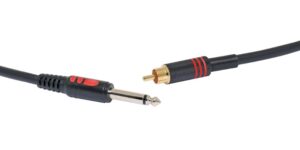
For a compatible TS-to-RCA connection, consider the Redback 6.35mm TS Jack-to-RCA Cable.
6.35mm TRS
A TRS connector has:
- Tip
- Ring
- Sleeve
It may carry:
- Balanced mono audio, or
- Unbalanced stereo audio
The connector shape alone does not reveal which format is being used.
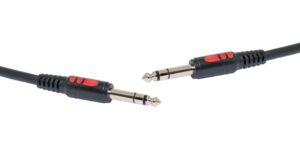
For compatible balanced audio equipment, use the Redback 6.35mm TRS-to-TRS Cable.
TS and TRS Are Not Automatically Interchangeable
A TRS plug may physically fit a TS socket, but that does not guarantee correct signal routing.
Possible issues include:
- One channel missing
- Reduced audio level
- Phase cancellation
- Noise
- Incorrect mono or stereo operation
Confirm the required wiring and signal format before ordering.
Browse our wider audio plugs and sockets for solder-termination plugs, panel sockets, right-angle adaptors and jack conversion products.
XLR Cables
Three-pin XLR is the standard connection for many microphones, mixers, stage boxes, interfaces and public-address systems.
A conventional microphone cable normally uses:
- Female XLR at the microphone end
- Male XLR at the mixer or interface end
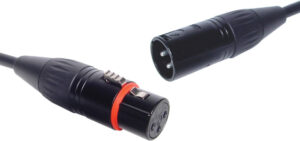
Our Redback XLR Male-to-Female Cable is available in multiple lengths.
Choose XLR For:
- Microphone to mixer
- Microphone to audio interface
- Balanced output to balanced input
- Stage and PA connections
- Recording setups
- Longer compatible cable runs
XLR to 6.35mm TRS
Some equipment provides a balanced 6.35mm TRS input rather than an XLR input.
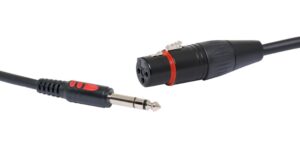
The Redback Female XLR-to-6.35mm TRS Microphone Cable is intended for compatible balanced microphone connections.
Before using one, confirm that the 6.35mm socket is:
- An input
- Wired for TRS
- Compatible with the source level
- Appropriate for the microphone or equipment
The cable does not provide microphone preamplification, phantom power or automatic level conversion.
Loose XLR Connectors
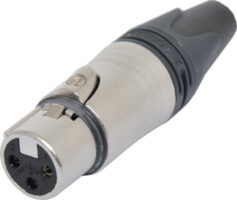
For cable repairs and custom assemblies, we stock products such as the Neutrik NC3FXX Three-Pin Female XLR Connector.
Browse our wider XLR connectors and adaptors for line plugs, chassis sockets and conversion products.
XLR and RCA Conversion
XLR and RCA commonly represent different signal arrangements and levels.
A simple cable may physically connect the equipment but may not resolve:
- Balanced-to-unbalanced conversion
- Level differences
- Ground-loop hum
- Impedance mismatch
- Electrical isolation requirements
For compatible systems, consider:
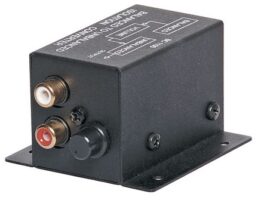
- Redback XLR-to-RCA Line Isolation Unit
- Redback RCA-to-XLR Line Isolation Unit
- Redback 600Ω XLR Line Isolation Transformer
TOSLINK Optical Audio
TOSLINK uses optical fibre to carry digital audio between compatible devices.
It is commonly found on:
- Televisions
- Soundbars
- AV receivers
- Media players
- Game consoles
- Digital audio processors
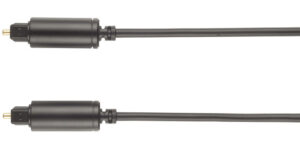
Our TOSLINK Optical Audio Lead is available in several lengths.
Choose TOSLINK When:
- Both devices have optical audio ports
- A TV needs to connect to a soundbar
- An optical output needs to connect to an AV receiver
- Electrical isolation between devices is useful
- Both products support a compatible audio format
TOSLINK does not automatically improve every system. The source and receiving devices must support the same digital-audio format, and their settings may need adjustment.
Optical Cable Accessories
Our optical audio cable range includes:
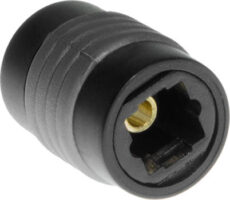
A right-angle adaptor can help where clearance behind wall-mounted equipment is limited.
Speaker Cable Is Different from Line-Level Audio Cable
Passive speakers require an amplified output from a compatible amplifier.
Speaker cable carries more current than a microphone, auxiliary or line-level connection. Select it according to:
- Speaker impedance
- Amplifier output
- Cable length
- Conductor size
- Installation environment
- Connector or terminal style
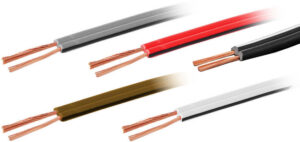
Browse our audio and speaker cable range when wiring compatible passive speakers.
Powered vs Passive Speakers
A powered speaker contains its own amplifier and normally accepts a line-level input.
A passive speaker requires an external amplifier and connects to the amplifier’s speaker output.
Do not connect a line-level source directly to a passive speaker and expect normal operation. Likewise, do not connect an amplifier’s speaker output to an ordinary line-level input.
Speaker Terminations
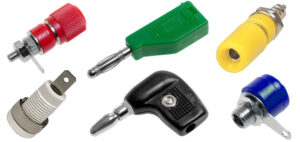
Our banana plugs, sockets and binding posts include:
- Gold-plated banana plugs
- Stackable banana plugs
- Screw-termination plugs
- Binding posts
- Speaker terminal assemblies
- Panel-mounted sockets
Choose connectors that match the amplifier and speaker terminals.
Adaptors, Splitters and Conversion Leads
An adaptor can be useful when the signal format is already compatible and only the physical connector needs to change.
Examples include:
- 3.5mm to RCA
- 3.5mm to 6.35mm
- TRRS headset splitter
- TOSLINK joiner
- XLR-to-TRS cable
- Right-angle adaptors
An Adaptor Does Not Necessarily Convert the Signal
A passive adaptor usually changes the connector arrangement only.
It may not provide:
- Digital-to-analogue conversion
- Analogue-to-digital conversion
- Microphone preamplification
- Phantom power
- Impedance matching
- Balanced-to-unbalanced isolation
- Headphone amplification
Check whether your setup requires an active converter, interface or isolation device.
MIDI Cables Do Not Carry Audio
MIDI transmits performance and control information rather than sound and can tell compatible equipment:
- Which note was played
- How hard it was played
- When it was released
- Which sound or program to select
- How a controller was moved
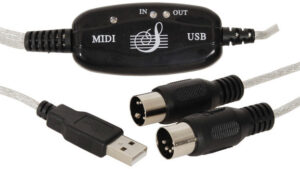
The MIDI-to-USB Cable can connect compatible MIDI equipment to a computer.
The actual audio from a keyboard or synthesiser must leave through a separate audio output or interface.
Check whether your equipment uses:
- Five-pin DIN MIDI
- USB MIDI
- 3.5mm MIDI
- A manufacturer-specific adaptor
Ready-Made Leads or Custom Cable Assemblies?
Choose a Ready-Made Lead When:
- Both connector types are known
- A standard length is suitable
- The equipment uses common ports
- A moulded cable offers the required durability
- No permanent installation is needed
Choose Bulk Cable and Loose Connectors When:
- A custom length is required
- Cable must pass through an installation route
- A panel connector is being fitted
- Existing cabling needs repair
- A specialised connector combination is required
- The installer has appropriate assembly and testing skills
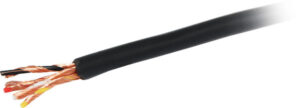
Our bulk-cable selection includes Four-Core Shielded Audio Cable for suitable microphone and general audio circuits.
Custom cables should be assembled with correct wiring, insulation, strain relief and testing.
How Long Should an Audio Cable Be?
Choose a cable long enough to follow a safe route without pulling on either connector.
Avoid purchasing excessive length merely for convenience. Unused cable can:
- Create clutter
- Become tangled
- Increase trip hazards
- Make fault finding harder
- Place strain on connectors when tightly coiled
For unbalanced analogue signals, shorter practical runs can also reduce exposure to interference.
Balanced connections are generally preferred for longer compatible microphone and line-level runs, but the entire connection must support balanced operation.
How to Reduce Hum and Interference
Noise is not always caused by a faulty cable.
Possible causes include:
- Unbalanced leads near power equipment
- Damaged shielding
- Loose connectors
- Ground loops
- Incorrect gain settings
- Incompatible signal levels
- Poor power supplies
- Faulty source or receiving equipment
- Audio cables routed alongside mains leads
To reduce problems:
- Use the correct cable type.
- Keep audio leads away from power transformers and mains cables where practical.
- Use balanced connections when both devices support them.
- Avoid unnecessary adaptor chains.
- Check that every plug is fully inserted.
- Test with a known working cable.
- Replace damaged or intermittent leads.
- Use an appropriate isolation device when a ground loop has been confirmed.
Testing Audio Cables
A cable can look undamaged while containing:
- Broken conductors
- Intermittent contacts
- Shorts between terminals
- Incorrect wiring
- Damaged shielding
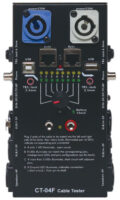
The 13-Way Audio/Video Cable Tester supports several common audio and AV connector formats.
Cable testing is useful for:
- Stage leads
- School equipment
- Recording studios
- Hire inventory
- Custom cable assemblies
- Frequently handled microphone leads
- Fault finding before an event
Label tested cables and remove unreliable leads from service.
Common Audio Cable Buying Mistakes
Choosing Only by Plug Shape
Two connectors may fit while carrying incompatible signals.
Check the port function, signal type and direction.
Confusing TS and TRS
TS commonly carries unbalanced mono audio. TRS may carry balanced mono or unbalanced stereo.
The equipment determines the actual use.
Assuming XLR Automatically Means Microphone Level
XLR connectors can carry microphone, line-level, digital or control signals depending on the equipment.
Read the port label.
Using an Adaptor Instead of a Converter
A passive adaptor does not normally convert between analogue and digital audio.
An active converter may be required.
Connecting Passive Speakers with Line-Level Cable
Passive speakers need an appropriate amplifier and speaker cable.
Assuming MIDI Carries Sound
MIDI carries instructions rather than audio.
Ignoring Connector Gender
Check whether each end requires a plug or socket.
Buying the Longest Cable Available
Choose enough length for a safe route with a modest allowance rather than creating an unnecessary coil.
Expecting TOSLINK to Support Every Format
The source and receiving equipment must support a common digital-audio format.
Building a Chain of Adaptors
Multiple adaptors add connection points and increase the risk of incompatibility or intermittent contact.
A purpose-made cable is often the cleaner solution.
Audio Cable Buying Checklist
Before ordering, confirm:
- What is the source device?
- What is the receiving device?
- Which connector is on the output?
- Which connector is on the input?
- Does each end require a plug or socket?
- Is the signal analogue or digital?
- Is it mono or stereo?
- Is it balanced or unbalanced?
- Is it microphone, instrument, line or speaker level?
- Does the cable need separate left and right channels?
- Do both devices support the same digital format?
- Is an active converter required?
- What cable length is practical?
- Will the cable be moved frequently?
- Is a right-angle connector needed?
- Does the installation require a ready-made lead or custom cable?
- How will the finished connection be tested?
Frequently Asked Questions
Which cable connects a phone or computer to an amplifier?
When the source has a 3.5mm stereo output and the amplifier has left and right RCA inputs, use a 3.5mm stereo-to-2×RCA cable.
The source may need a USB-C or Lightning audio adaptor if it does not have a headphone socket.
Is RCA or 3.5mm better?
Neither connector is automatically better.
Choose the option that matches the equipment. Both are commonly used for unbalanced analogue audio.
Is XLR better than TRS?
XLR and TRS can both carry balanced mono audio when the cable and connected equipment support it.
The best choice is normally the connector provided by the equipment.
Can a TRS cable carry stereo audio?
Yes. A TRS connection can carry unbalanced stereo audio.
It can also carry balanced mono audio in another application, so check the device specifications.
Can I connect an XLR microphone to a 6.35mm input?
An XLR-to-6.35mm cable can be used where the equipment connections, wiring and signal levels are compatible.
The cable does not add a microphone preamplifier or phantom power.
Which cable connects a TV to a soundbar?
Use a TOSLINK optical lead when both devices have compatible optical ports.
Other systems may use HDMI ARC or eARC, depending on the equipment.
Can I split one optical output into two?
A passive TOSLINK splitter can physically divide an optical signal, but compatibility, signal strength and cable length still matter.
Can I use a guitar cable as a speaker cable?
Do not assume an instrument cable is suitable for an amplifier-to-speaker connection.
Use cable designed for the amplified speaker signal.
Does MIDI carry sound from a keyboard?
No. MIDI carries performance and control information.
The keyboard’s audio output requires a separate audio connection.
Why does my audio cable hum?
Possible causes include a damaged cable, unbalanced connection, ground loop, poor routing, incompatible equipment or incorrect gain settings.
Test with a known working cable and simplify the connection before adding adaptors or isolation equipment.
Match the Cable to the Equipment
The easiest way to choose an audio cable is to begin with the two devices.
Identify the source output and receiving input, then confirm the signal type. Only after those details are known should you select the connector combination and cable length.
Use 3.5mm for compatible headphones, computers and auxiliary connections. Choose RCA for many consumer Hi-Fi components, XLR or TRS for compatible balanced professional equipment, and TOSLINK for supported optical digital-audio connections.
Use dedicated speaker cable between an amplifier and passive speakers, and remember that MIDI carries control data rather than sound.
Explore our complete selection of audio cables, 3.5mm plugs and sockets, RCA plugs and sockets, XLR connectors and adaptors, optical audio cables, audio and speaker cable and banana plugs and binding posts.
© Electrotech Brands Pty Ltd 2026
Write a Comment
You must be logged in to post a comment.