

Tekky Electronics Kits: Build Sirens, Door Chimes and Light Alarms
October 30, 2026
Tekky Electronics Kits: Build Sirens, Door Chimes and Light Alarms
The first sound from a circuit you have assembled is a rewarding moment. A collection of components has become something that responds, signals or makes a recognisable sound. The next question makes the project even more useful: can you explain why it works?
At Wiltronics, our Tekky electronics kits offer practical projects for learning about circuits. The 9VDC Siren Kit, Ding Dong Door Chime Kit and Light Alarm Kit provide three different starting points: generating a sound, producing a two-tone chime and responding to light.
This guide helps you choose a project, prepare the equipment and turn a completed build into a useful investigation.
Which Tekky kit should you choose?
Choose around the result you want learners to investigate. A familiar door chime provides a clear connection to everyday electronics. A siren introduces electronic sound generation. A light alarm adds an environmental input that students can control and observe.
| Kit | Project focus | Required batteries, supplied separately | Suggested learning activity |
|---|---|---|---|
| Tekky 9VDC Siren Kit — KI0231 | Electronic siren sound | One 9V battery | Explain the path from electrical power to sound |
| Tekky Ding Dong Door Chime Kit — KI0205 | Two-tone door chime | Two AAA batteries; 3V DC operation | Investigate the difference between pitch and duration |
| Tekky Light Alarm Kit — KI0208EP | Light detection and an audible response | One 9V battery | Compare responses under controlled lighting conditions |
These are construction projects. Review the assembly instructions and the supervision required before choosing a kit for a learner or class. Do not assume the kits share the same power requirements simply because they belong to the same range.
1. Tekky 9VDC Siren Kit: make a circuit heard
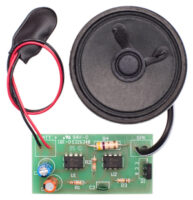
Our Tekky 9VDC Siren Kit uses a voltage-controlled oscillator and includes a 0.5W, 8Ω speaker. It operates from 9V DC and requires a battery purchased separately.
The project gives learners a concrete outcome to connect with the circuit diagram. Instead of finishing with “it makes a noise”, ask them to identify the power connections, the sound-generating section and the speaker.
Suggested activity: explain the finished system. Have learners produce an annotated photograph or sketch with three labels: power source, circuit and sound output. Ask them to describe the role of each part in their own words and record how they checked that their build worked.
Keep sound tests brief and away from ears. For a class, test one group at a time so each team can hear and assess its own result.
2. Tekky Ding Dong Door Chime Kit: investigate tone and timing
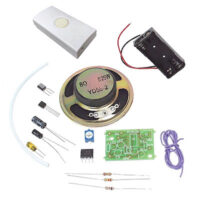
Our Tekky Ding Dong Door Chime Kit produces a familiar two-part sound. Its circuit uses an integrated circuit and two resistor-capacitor networks associated with the “ding” and “dong”.
It runs on 3V DC from two AAA batteries. Do not connect a 9V battery to this kit.
The linked instructions describe a trimpot adjustment for changing the tone. This gives learners an investigation to attempt after the standard circuit is assembled and working.
Suggested activity: distinguish pitch from duration. Start with a baseline description of the chime. Under supervision, adjust the documented tone control in small steps and record what changes. Does the sound become higher or lower? Is that the same as making it last longer?
For a more advanced extension, the instructions discuss capacitor changes affecting the two sound durations. Treat this as a separate, supervised activity: first verify the supplied circuit, then follow the documented method with suitable components and disconnect power before making changes.
3. Tekky Light Alarm Kit: turn a changing input into a response
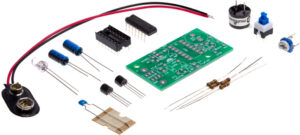
Our Tekky Light Alarm Kit introduces a light-sensitive input. The kit requires a separate 9V battery, and the KI0208EP listing includes an education pack with a downloadable project resource.
The circuit documentation describes an alarm that sounds when light is detected. It also describes a short continuation of the sound after the sensor returns to darkness. This makes the kit useful for investigating both detection and response time.
Suggested activity: conduct a repeatable light test. Fix the circuit and light source in place. Compare the response with the sensor exposed, partially shaded and covered. Record the conditions and what happens each time, including whether the sound stops immediately.
Repeat each condition before drawing conclusions. Keep the light source, sensor direction and room lighting consistent. A hand moving across the sensor can be a useful first demonstration, but a fixed shade makes repeated comparisons easier.
Ask learners: “What evidence shows that the input changed?” and “Why should we wait before recording the final output?”
Prepare the whole build, not just the kit
Before ordering a classroom set or starting a home project, read the matching instructions and check the supplied parts list. Plan the tools and consumables separately from the electronics kit.
- The correct batteries for each project.
- Suitable soldering equipment, a stable iron stand and appropriate fume control.
- Side cutters and other assembly tools specified by the instructions.
- A clear work surface, component tray and good task lighting.
- Access to a suitable multimeter for supervised checks.
- Time for inspection, testing and correction as well as assembly.
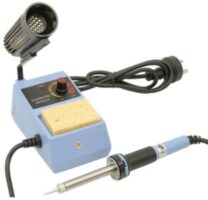
Our soldering equipment range and multimeters can help equip the workbench. Match tools to the task and the learner’s experience. Follow the kit instructions and your workshop or school procedures for hot tools, clipped leads and battery handling.
For example, a class building five of each featured kit needs ten 9V batteries and ten AAA batteries, before allowing for spares. Counting batteries by project avoids discovering a missing supply at the testing stage.
Use a build–check–test routine
Give learners clear checkpoints so that finding a fault becomes part of the work.
- Identify: Match components to the parts list and board positions before assembly.
- Assemble: Follow the supplied sequence, paying attention to orientation and polarity where marked.
- Inspect: With power disconnected, check placements, connections and solder joints against the instructions.
- Test: Connect the specified supply and compare the result with the expected behaviour.
- Explain: Record what happened, any correction made and the evidence that the correction worked.
A useful project record has four columns: expected result, observed result, check performed and outcome. Ask learners to change one thing at a time so that they can explain which correction mattered.
When a kit does not work first time
Begin with simple checks before replacing components. Disconnect the battery before inspecting or changing the assembly.
| Symptom | First checks |
|---|---|
| No sound | Correct battery type, battery condition, polarity, power connections and speaker wiring |
| Intermittent operation | Loose leads, incomplete joints or connections disturbed when handled |
| Unexpected door-chime tone | Documented trimpot setting and component placement |
| Light alarm responds inconsistently | Sensor orientation, shading and changing room light |
| Light alarm continues briefly after covering | Compare with the delay described in its instructions |
These are starting points, not guaranteed diagnoses. Work through the kit’s troubleshooting material and seek assistance if the result remains unclear.
Frequently asked questions
Are batteries included?
No. The three featured product listings specify batteries separately. The siren and light alarm each need a 9V battery; the door chime needs two AAA batteries.
Do I need an Arduino or computer?
These projects are dedicated electronic circuits. Their documented operation does not depend on an Arduino board or a coding activity.
Do these kits require soldering?
Plan for soldered circuit-board assembly and check the supplied instructions before starting. Learners need suitable tools, instruction and supervision for that work.
Which project should I start with?
Choose by interest and the support available. The door chime offers a familiar sound and a documented tone adjustment; the siren focuses on sound generation; the light alarm adds a sensor investigation. Review the actual assembly requirements rather than judging difficulty from the finished effect.
Does every Tekky kit include an education pack?
Check the individual listing. The featured Light Alarm Kit is explicitly listed as KI0208EP with an education pack. Do not assume every product in the wider category includes identical teaching materials.
Can I combine the kits into one alarm system?
Do not connect their circuits together without a verified design. Different supply voltages and circuit interfaces need to be considered. Build and test each project independently first.
Start your next electronics project with Wiltronics
Choose a sound-generating siren, a two-tone door chime or a light-responsive alarm, then give the build a clear question to answer. A successful project should leave learners with both a working circuit and an explanation of what they observed.
Explore our Tekky STEM kits and open the instructions for your chosen project to prepare the parts, tools and batteries before you begin.
© Electrotech Brands Pty Ltd 2026
Write a Comment
You must be logged in to post a comment.