

Network Cable Testers - How to Choose the Best Model
September 15, 2026
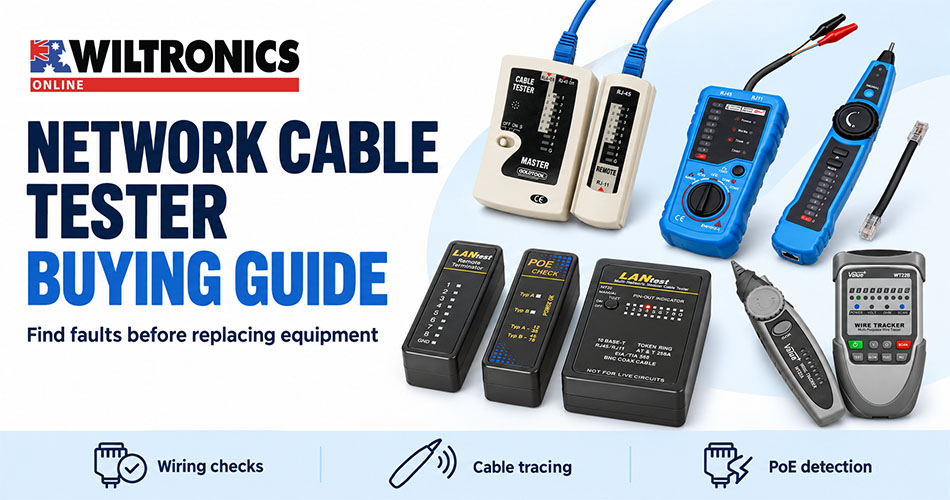
Network Cable Testers – How to Choose the Best Model
A workstation has lost its wired connection. A cable in the cabinet has no label. A Power over Ethernet (PoE) device will not start. Each problem calls for a different check—and choosing the right tester can help you decide what to investigate before replacing equipment.
For home-office troubleshooting, workshop checks and small-business IT support, start with the question you need answered. Do you need to check a lead’s connections, identify its other end or detect a compatible PoE supply?
This network cable tester buying guide compares four Wiltronics options, explains common results and gives you a repeatable process for checking removable patch leads.
Quick answer: which cable tester do you need?
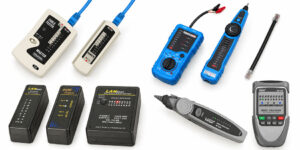
Choose a basic tester for pin-connection checks, a tone probe for identifying cables, or a dedicated PoE finder for compatible powered ports. Use the comparison below to build your shortlist.
| Your main task | Wiltronics option | Why consider it? |
|---|---|---|
| Check the connections in a disconnected modular lead | TST-NET network cable tester | Sender and receiver with LED indication; RJ45 and RJ11 connections |
| Combine wiring checks with tone tracing | FWT11 tester and tracker, ME5710 | RJ11/RJ45 testing and a tone-tracing arrangement |
| Check wiring and detect compatible PoE supplies | Mini network cable tester with PoE finder, ME5784 | Cable tester and a separate PoE finder in one kit |
| Identify cables and investigate wiring faults | Network cable fault tester and tracer, ME5112 | Continuity and wiring-sequence checks, tracing probe, adjustable sound and probe light |
1. Decide what a successful test must establish
Several different capabilities sit under the name “network cable tester”.
| Test capability | What it helps establish |
|---|---|
| Continuity and wire mapping | Whether conductors connect end to end and reach the expected pins |
| Tone tracing | Which cable corresponds to the connected transmitter |
| PoE detection | Whether a supported power source or power mode is detected |
| Performance qualification | Whether the cabling supports the tested network application or data rate |
| Certification | Whether the installation meets the selected cabling standard’s test limits |
A basic wiring pass does not prove network speed. Performance qualification and formal certification require instruments designed for those tasks. The four products below focus on wiring checks, tracing or PoE detection; select a different test level if your job requires performance evidence. Cable manufacturer trueCABLE explains the testing levels.
2. Understand the results you are looking for
The ME5784 instructions illustrate four useful results:
- Continuity: a conductor connects between the tested ends.
- Open: an expected connection is missing.
- Short: conductors have an unintended connection.
- Miswire: a conductor reaches an unexpected pin.
Read the transmitting and receiving indications together using the instrument’s instructions. Seeing lights appear is not enough; their correspondence matters. The manual also warns that a weak battery can produce incorrect results. ME5784 cable tester instructions.
Record the affected pin or displayed fault. A note such as “pin 4 open” gives you a specific result to check again after changing the lead or referring the fault for repair.
3. Match the product to your routine
TST-NET: for straightforward lead checks
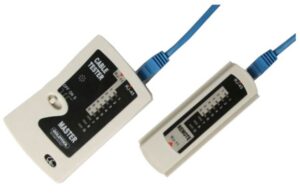
Choose the TST-NET network cable tester when your main task is checking disconnected RJ45 or RJ11 leads. Separate sending and receiving sections show the results through LEDs, and the kit includes a carry case.
The listing references CAT5e and 10/100Base-T connection testing. It requires a 9V battery. This is the simplest option in the shortlist for users focused on basic connection checks.
FWT11 / ME5710: for testing and cable identification
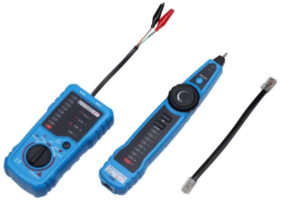
The FWT11 network cable tester and tracker adds tone tracking to RJ11/RJ45 testing. Wiltronics lists continuity, wiring-fault and polarity checks, making it worth considering when finding the correct lead is a regular task.
It requires two 9V batteries, not included. The listing also mentions length testing, but omits its method, range and accuracy; confirm those details if length measurement is essential.
ME5784: for wiring checks and PoE detection
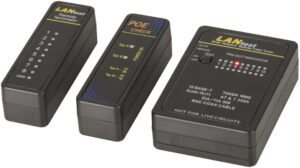
Choose the ME5784 mini network cable tester kit when your work includes both disconnected leads and compatible PoE supplies. It includes a main tester, remote terminator, separate PoE finder and adaptors, with manual or automatic cable scanning.
The cable tester requires a 9V battery, not included. Use the dedicated finder for the powered check, following the connection guidance in the next section.
ME5112: for tracing in dim or noisy locations
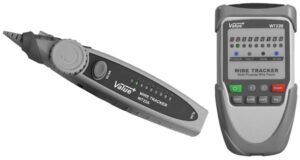
The ME5112 network cable fault tester and tracer combines RJ45/RJ11 wiring checks with a tracing probe. Its adjustable sound, earphone socket and probe light are useful when background noise or poor visibility makes identification harder.
Wiltronics lists open, short and crossed-pair detection. The transmitter uses three AA batteries; the receiver uses a 9V battery. For long runs, confirm which function and conditions its stated 1km test limit covers—this is not an Ethernet operating-distance rating.
4. Keep PoE detection separate from cable testing
The ME5784 manual explicitly warns against connecting its ordinary LAN tester to powered circuits. Its separate PoE finder is intended for the powered check and lists IEEE 802.3af/at compatibility with Type A/B indications. Follow the instructions for the correct module and connection. ME5784 user guide.
A PoE indication is an initial observation. Establishing the available power under load requires an instrument with that specific capability. Basic presence detection and detailed PoE load testing are different functions. trueCABLE’s tester comparison.
If a device still fails to start, record the detected indication and check its power requirements against the supply’s capabilities before drawing a conclusion.
5. Use a repeatable troubleshooting sequence
For removable patch leads, the following workflow keeps the investigation organised:
- Record the symptom. Note the device, port and whether the problem is constant or intermittent.
- Label the connections. Photograph or record where each lead belongs before disconnecting anything.
- Check the tester setup. Confirm the battery, remote, adaptor leads and selected mode with a known-good lead.
- Test the suspect lead disconnected from equipment. Use the correct sockets and compare the result with the manual.
- Change one thing. If a suitable known-good replacement lead is available, substitute it and recheck the original symptom.
- Record the outcome. Keep the lead identity, fault indication and result after substitution together.
For example, if the fault disappears after substituting one patch lead, you have narrowed the investigation without changing the rest of the setup. Retain the suspect lead’s test result alongside that observation.
Refer installed-cabling faults to the person responsible for the installation, with your connection labels and test results.
Before you order
Check connector compatibility, access to both ends and the conditions in which you will work. Confirm that any powered-port test is supported by the exact input and mode you intend to use.
For occasional patch-lead checks, straightforward controls may matter most. For repeated cable identification, compare probe handling, audible indication and visibility. If you must supply a report, establish the required test level and reporting format first.
Frequently asked questions
Do I need access to both ends of the cable?
The sender-and-receiver wiring checks described here require connections at both ends. A remote unit lets you test when those ends are in different locations. Check whether you also need short adaptor leads for wall sockets or patch panels. ME5784 remote-test instructions.
Why check a known-good lead first?
It helps confirm that the tester, battery, remote and chosen setup are behaving as expected before you interpret a suspect lead’s result. Keep a suitable reference lead in your testing kit.
What should I record when handing a fault to someone else?
Include the device and port, cable labels, symptom, tester and mode used, displayed result, and what happened after any substitution. Those details give the next person a useful starting point.
Find the right cable tester at Wiltronics
Build your troubleshooting kit around the work you actually do. Start with dependable connection checks, add tracing when cable identification takes time, and choose dedicated PoE capability when powered ports are part of the job.
© Electrotech Brands Pty Ltd 2026
Write a Comment
You must be logged in to post a comment.