

DC Barrel Plug Sizes: 2.1mm vs 2.5mm and Polarity Explained
September 29, 2026
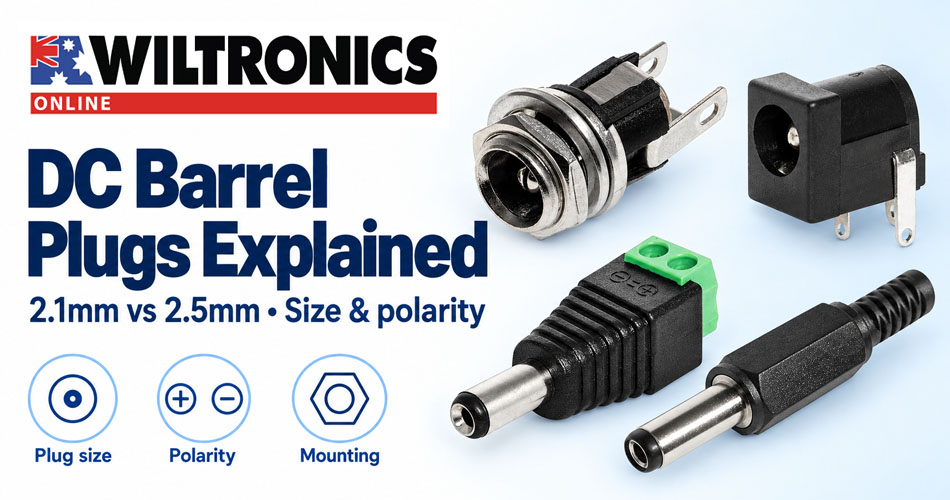
DC Barrel Plug Sizes: 2.1mm vs 2.5mm and Polarity Explained
A power plug that slides into a socket can still be the wrong connector. A loose centre contact may cause intermittent resets, while an incorrect voltage or reversed polarity can damage the equipment.
To choose a DC barrel connector, match its outer diameter, inner diameter and barrel length, then confirm the equipment’s voltage, polarity and current requirements. Two plugs with the same outside diameter can have different centre openings.
Use the checks below when replacing a low-voltage lead or adding a power inlet to a project enclosure.
1. Make a compatibility checklist before shopping
Read the equipment label and manual, then record these details together:
| Check | Information you need |
|---|---|
| Supply type | DC or AC output, as specified by the equipment |
| Voltage | Required input voltage and any permitted range |
| Current | Required operating current, including documented start-up requirements |
| Polarity | Centre-positive or centre-negative for a DC barrel connection |
| Connector dimensions | Outer diameter, inner diameter and required barrel reach |
| Installation | Cable, panel or PCB mounting; termination and clearance requirements |
A useful equipment label might read: “12V DC, centre-positive, 5.5mm OD × 2.1mm ID”. Add the required current and connector length to your project notes. “Small round power plug” leaves too much room for error.
2. Understand 2.1mm versus 2.5mm
Two familiar barrel-plug combinations are 5.5mm outer diameter with a 2.1mm inner diameter, and 5.5mm outer diameter with a 2.5mm inner diameter. Same Sky lists both combinations in its DC power plug range.
The outside can therefore look identical while the centre connection differs.
| Plug dimension | 5.5 × 2.1mm version | 5.5 × 2.5mm version |
|---|---|---|
| Outer barrel diameter | 5.5mm | 5.5mm |
| Inner opening | 2.1mm | 2.5mm |
A larger inner opening on a smaller centre pin can produce unreliable contact. A smaller opening will not correctly accommodate a larger pin. Forcing a connector is never a useful compatibility test.
Do not assume every connector described as “2.1mm” has a 5.5mm outside diameter. Check the complete dimensions, and check which order a supplier uses when writing them.
Barrel length also matters. A recessed inlet may require extra reach. Conversely, a longer barrel is not automatically a better replacement. Match the original arrangement or the equipment drawing.
For identification, unplug the lead from its supply before measuring. Callipers can help with the outside diameter and exposed barrel length; a small internal opening is harder to measure reliably. Use the equipment documentation or a dimensioned connector drawing to settle uncertainty.
3. Check polarity separately from size
Centre-positive means the central contact is positive relative to the outer sleeve. Centre-negative means the central contact is negative relative to the sleeve.
On a polarity symbol, follow the line from the plus or minus sign to the central dot. The curved outer symbol represents the sleeve. Read the actual connections in the symbol rather than relying on where the signs sit on the label.
A correctly sized plug does not establish polarity. Neither does the colour of its plastic housing. When assembling a lead, identify each terminal and confirm the completed wiring before connecting equipment.
A passive size adaptor changes the mechanical connection. It does not regulate voltage, increase available current or necessarily reverse polarity. Check exactly what the adaptor connects.
4. Can you use a power supply with a higher current rating?
For a conventional regulated constant-voltage supply, the load determines the current drawn during normal operation. A higher supply current rating does not by itself force that current into the device.
For example, consider equipment documented to require regulated 12V DC at up to 1A. A regulated 12V, 2A supply may be suitable if its polarity, connector, output quality and other requirements also match. An otherwise similar 19V supply is not a substitute.
The connector and cable still need their own suitable ratings. Do not treat a power supply’s current capacity as proof that every attached plug, adaptor or wire can carry it.
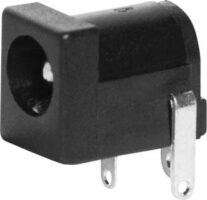
Wiltronics PL6822 2.1mm PCB socket is 30V DC, 3A. That specification belongs to this socket. It does not establish the rating of another 2.1mm connector or of a complete assembled lead.
Where a listing omits an electrical rating needed for your application, obtain it before selecting the part.
5. Choose a cable, panel or PCB connector
These six Wiltronics options cover screw-terminated leads, soldered leads, enclosure inlets and PCB connections. Match the mounting style to your assembly, then confirm the mating dimensions and electrical requirements.
| Your assembly requirement | Wiltronics option | Listed features |
|---|---|---|
| Connect a cable using screw terminals | PL6908 screw-terminating DC line plug | 2.1mm ID, 5.5mm OD, 14mm barrel |
| Solder a cable to a long-shaft plug | PL6814LS DC line plug | 2.1mm ID, 5.5mm OD, 14mm barrel; solder tags |
| Make a soldered lead for a 2.5mm connection | PL6815LS DC line plug | 2.5mm ID, 5.5mm OD, 14mm barrel; solder tags |
| Fit an enclosure inlet for a 2.1mm plug | PL6842 switched panel socket | Panel mounting; solder tags; switched contacts |
| Fit an enclosure inlet for a 2.5mm plug | PL6845 switched panel socket | Listed as a 2.5mm switched panel socket; solder tags |
| Mount the inlet directly on a circuit board | PL6822 PCB socket | 2.1mm pin; listed 30V DC, 3A rating |
A cable-mounted plug needs protection against pulling and repeated bending. A panel socket needs room for the connector body, terminals and internal wiring. A PCB replacement must match the board footprint as well as the external plug.
PL6908: screw termination for custom power leads
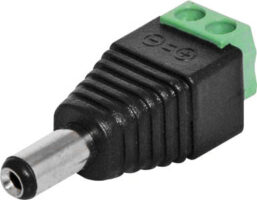
The PL6908 2.1mm screw-terminating DC plug lets you connect wires using screw terminals. Its listed dimensions are 5.5mm outside diameter, 2.1mm inside diameter and a 14mm barrel.
Consider it when assembling a custom low-voltage lead and you prefer a screw connection. Check that the terminals accommodate your chosen wire, keep exposed conductor within the terminal area and support the cable so pulling does not load the connections.
Selection point: choose it for the termination method, then confirm its dimensions and electrical ratings suit the equipment.
PL6814LS: a soldered 2.1mm lead with a 14mm barrel
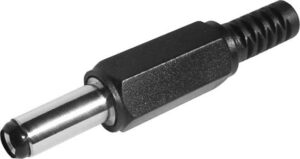
The PL6814LS long-shaft DC plug combines a 5.5mm outer diameter and 2.1mm inner diameter with solder-tag connections and a 14mm barrel.
It is an option for a replacement lead or custom cable where those dimensions match the inlet. The specified barrel length is particularly useful when checking whether a plug can reach a recessed socket.
Selection point: compare the required insertion reach before ordering, and allow for insulation and strain relief when assembling the lead.
PL6815LS: the 2.5mm option for a soldered lead
The PL6815LS long-shaft DC plug has a 5.5mm outer diameter, 2.5mm inner diameter and 14mm barrel, with solder-tag termination.
This makes it a useful comparison with the PL6814LS: the listed outside diameter and barrel length are the same, but the centre opening differs. Keep the two sizes clearly labelled in a workshop parts collection.
Selection point: choose the 2.5mm version only when the equipment specifies that mating size. A similar appearance is not enough to establish compatibility.
PL6842: a 2.1mm power inlet for an enclosure
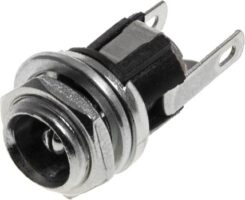
The PL6842 switched panel-mount DC socket is listed for 2.1mm DC plugs and uses solder tags for the internal connections.
Consider this style when you want the inlet mounted on the enclosure wall, with wires running to the circuit inside. Plan the location around plug access, internal components and the room needed to solder and insulate the terminals.
Selection point: verify the panel opening, mounting arrangement and rear clearance before drilling. Identify the switched contact from the connector documentation.
PL6845: a panel-mount option for a 2.5mm connection
The PL6845 switched panel-mount DC socket provides a 2.5mm option in the panel-socket selection, with solder-tag termination.
It belongs on the shortlist when an enclosure project requires a 2.5mm inlet. Confirm the complete mating and mounting dimensions before committing to the enclosure layout; the nominal connector size alone does not define the required panel cut-out.
Selection point: establish which terminal performs each function before wiring, especially if the circuit uses the switching contact.
PL6822: a PCB-mounted inlet with a listed electrical rating
The PL6822 2.1mm DC PCB socket places the power connection directly on the circuit board. Wiltronics lists a rating of 30V DC, 3A.
Consider it for a board design or repair where its dimensions and terminal layout match. For a replacement, compare the footprint and contact functions with the original part before soldering. For a new design, allow space for the connector body and the inserted plug.
Selection point: the socket rating is one part of the power path; the mating plug, wiring and PCB tracks also need to suit the load.
6. What does a switched DC socket do?
Some barrel sockets include a contact that changes state when a plug is inserted. Depending on the circuit, it can support plug detection or disconnect an internal power path.
“Switched” does not necessarily mean a separate user-operated on/off switch. It also does not imply battery charging, reverse-polarity protection or automatic voltage selection.
Use the specific connector’s contact diagram. If identifying terminals with a continuity meter, disconnect every power source first and compare the contact states with the plug removed and inserted. Do not copy the pin order from a similar-looking socket.
Same Sky’s connector selection article explains the distinction between the power contacts and an additional switching contact.
7. Diagnose an intermittent connection methodically
Equipment that restarts when the lead moves does not automatically need a new power supply. The fault could be a mismatched plug, damaged cable, worn socket or cracked connection inside the equipment.
Start with the supply disconnected:
- Compare the specified plug dimensions with the installed lead.
- Inspect the cable near the plug and any point where it bends sharply.
- Look for loose mounting hardware, visible damage or a socket that moves relative to its enclosure.
- Verify replacement-lead continuity and polarity before use.
- If substituting a known-good supply, match all the equipment requirements first.
Avoid repeatedly wiggling a powered connection to keep equipment running. Identify and repair the underlying fault, particularly where power interruptions could corrupt stored data or interrupt a process.
Choose your DC connector with confidence
Use the product comparison above to shortlist the mounting style you need, then check it against your completed compatibility checklist. Keep those details with your project so a future replacement is straightforward.
If you need help identifying a connector, contact Wiltronics with the equipment model, a clear photo of its input label and the connector dimensions you have confirmed.
© Electrotech Brands Pty Ltd 2026
Write a Comment
You must be logged in to post a comment.