

Raspberry Pi 400 & Accessories from Wiltronics
December 10, 2025
compact keyboard. Just add a monitor, mouse, power and a microSD card, and you’ve got a complete
desktop-class computer that also doubles as a powerful STEM learning and maker platform.In this blog we’ll take a quick look at the Raspberry Pi 400 itself and highlight some
Wiltronics accessories that help you turn it into a ready-to-go workstation or project hub.
Meet the Raspberry Pi 400
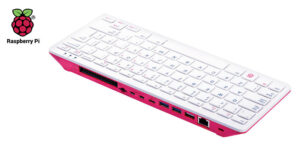
The Raspberry Pi 400 Desktop Computer – 4GB RAM
is a complete personal computer built into a Raspberry Pi–branded keyboard. At the back you’ll
find dual micro HDMI ports, USB ports, a 40-pin GPIO header, Gigabit Ethernet and a USB-C
power input. Inside is a quad-core 64-bit processor with 4GB of RAM – more than enough for
everyday tasks, coding, and a wide range of projects.
Out of the box, the Pi 400 is perfect for:
- Learning to code in Python and other languages
- Surfing the web, email and light productivity work
- Running STEM and digital technologies lessons
- DIY electronics and GPIO-based projects
- Media playback, retro games and more
Raspberry Pi 400 and Accessories (All from Wiltronics)
While the Pi 400 is a powerful all-in-one unit, you’ll still need a few accessories to get
the best experience – especially if you’re using it for STEM classrooms, home learning or
maker projects. Here are some Wiltronics options to consider.
Raspberry Pi 400 Desktop Computer – 4GB RAM
The heart of your setup. This compact keyboard computer includes the Raspberry Pi board,
4GB of RAM and all the core ports you need in a single tidy package. Ideal for students,
home users and makers who want a simple, low-cost computer that plugs straight into a TV
or monitor via HDMI.
5V Power Supply for Raspberry Pi 4 (USB-C)
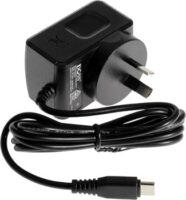
A reliable power supply is essential for any Raspberry Pi system. This 5V 3.0A USB-C
power supply is designed for Raspberry Pi 4 models and is also suitable for powering a
Raspberry Pi 400 setup. It delivers stable power to help prevent random restarts or SD
card corruption, especially when you’re using USB peripherals.
HDMI Socket to Micro HDMI D Plug Adapter

The Raspberry Pi 400’s video outputs use micro HDMI connectors. This compact adapter
converts a micro HDMI plug to a standard HDMI-A socket, letting you easily use your
existing HDMI leads and monitors with the Pi 400. Handy on the bench or in classrooms
where you’re constantly swapping displays or cables.
Raspberry Pi Leads, Adapters & Power Supplies

Need extra HDMI leads, Ethernet cables or USB power options? This category brings
together a wide range of Raspberry Pi-friendly cables and power supplies, helping you
connect your Pi 400 to networks, displays and other equipment in the lab or at home.
Raspberry Pi Accessories & Computer Peripherals
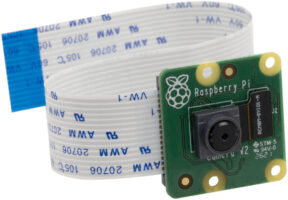
Round out your setup with monitors, cases, keyboards, mice, gamepads, cameras and more.
The Raspberry Pi Accessories & Computer Peripherals range at Wiltronics covers
everything from extra USB hubs through to displays and camera modules that can be used
alongside your Pi 400 for coding, media projects and STEM lessons.
Pi 400 in the Classroom and at Home
For schools, the Raspberry Pi 400 offers a tidy, low-maintenance way to put real computers
in front of students. Because the unit is built into the keyboard, there are fewer loose
parts to manage, and it’s easy to store entire class sets. Combine the Pi 400 with quality
power supplies, HDMI adapters and SD cards and you’ve got a robust platform for teaching
coding, digital technologies and electronics.
At home, the same accessories make it simple to use the Pi 400 as a family PC, a compact
workstation for side projects, or a dedicated box for coding, retro gaming or media
playback.
Getting Started with Your Setup
- Connect the Pi 400 to a monitor or TV using a suitable HDMI lead or adapter.
- Insert a microSD card prepared with Raspberry Pi OS.
- Plug in your USB-C power supply and any USB mouse or other peripherals.
- Power on, follow the on-screen setup wizard, and you’re ready to explore.
From there, you can install educational software, set up a simple programming environment,
or start experimenting with projects that use the Pi’s GPIO header (via additional GPIO
accessories and kits).
Explore Raspberry Pi 400 & Accessories at Wiltronics
Whether you’re equipping a classroom, building a home learning station or creating your
next maker project, Wiltronics has you covered with Raspberry Pi 400 units and a wide
choice of compatible accessories.
Browse the full Raspberry Pi range here:
www.wiltronics.com.au/product-category/raspberry-pi/
© Electrotech Brands Pty Ltd 2025
Write a Comment
You must be logged in to post a comment.